vtiger.com
home vtiger crm vtiger forums discussions wiki Customer Portal online store
Home | Advertise | Site Map
tranparent spacer image

Transparent spacer image
Toll Free: +1-877-788-4437 (+1-877-7vtiger)
transparwent spacer image vtiger CRM Home  |  Live Demo  |  Downloads  |  Features   |  Product Brochure  |  Documentation  |   Screenshots  |  FAQ  |  Road Map  |   Sponsor vtiger
Home Features Microsoft Outlook Integration

Microsoft Outlook Integration

In most of the small and medium businesses, E-mail and CRM applications are stacked incrementally in an IT infrastructure over a period of time. Initially e-mail service plays a vital role in communicating with customers. Once the business expands to a stage where it is very difficult to manage customers with the existing e-mail service, companies look for more sophisticated customer relationship management solutions. By that time, usage of e-mail service would have become popular and users as well as IT managers would feel reluctant to give up the existing e-mail service for different reasons. At the same time, they would like to use the CRM systems to increase the productivity.

In a broad perspective, Customer Relationship Management solutions (installed as well as hosted) and e-mail services complement to each other. Most of the surveys reveal that the Microsoft® Outlook® e-mail service is the one of the top most available e-mail clients in the market.

Many CRM vendors claim that they are providing Microsoft® Outlook® integration with their CRM solution but customers have to bear the additional charges. Most of the open source CRM projects are not exceptional to this trend. They provide CRM software as free and open source but when it comes to Microsoft® Outlook® integration, it is closed source. Realizing this fact, vtiger CRM team released vtiger Outlook Plug-in for Microsoft® Outlook® users as an Open Source Project in SourceForge.net.

The vtiger Outlook Pug-in for Microsoft® Outlook® is a fully functional, enterprise grade business productivity enhancement utility and it is evolving rapidly based on open source community feedback.

Key Features

  • Synchronize contacts between Microsoft® Outlook® and vtiger CRM
  • Add customer-related incoming and outgoing E-mail messages from Microsoft® Outlook® to contacts in vtiger CRM
  • Filter E-mails in Microsoft® Outlook® and add only necessary e-mails to vtiger CRM
  • Synchronize customer-related tasks between Microsoft® Outlook® and vtiger CRM
  • Synchronize customer-related calendar (calls and meetings) between Microsoft® Outlook® and vtiger CRM
  • Resolve conflicts if there are any mismatch between Microsoft® Outlook® and vtiger CRM data (contacts, tasks, and calendar)

Try vtiger Outlook Plug-in with vtiger CRM Demo

Before adding or synchronizing Microsoft® Outlook® e-mails and contacts to vtiger CRM Demo running at http://www.vtigercrm.com/demo/, provide the vtiger CRM demo login details in Microsoft Outlook as follows:

  1. Start the Microsoft® Outlook®.
  2. Select the Tools -->Options menu.
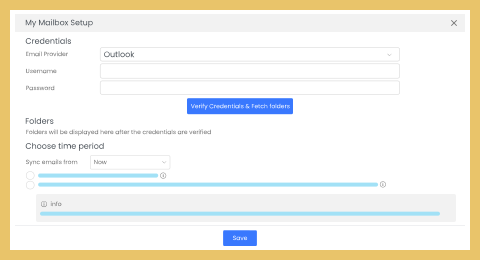
  3. In Options dialog, select the vtiger CRM tab and enter the following user settings:
    • User Name: Enter the user name as "admin".
    • Password: Enter the password as "admin".
    • Host Name: Enter the vtiger CRM live demo server name as "www.vtigercrm.com.demo/".
    • Remember Password: Select the check-box if you want to remember the login details.
  4. Click the OK button to apply the changes.
  5. Now start working with vtiger Outlook Plug-in.

Notes:

  • Ensure Microsoft® Outlook® version 2000 or higher is installed in your machine.
  • Install vtiger Outlook Plug-in 4.2 in your machine before connecting to vtiger CRM Live Demo.
  • Kindly do not expose your valuable real-time data in vtiger CRM demo. Because, the data exposed in the demo can be accessed by anyone and may be misused.
  • For additional information, refer to vtiger Outlook Plug-in User Guide.
Discussions  RSS  New Post   Policy

sponsor vtiger
 Post your Wish / Problem
 

SourceForge.net Logo 
© 2003-2005 vtiger.com. All rights reserved.
vtiger is a trademark of vtiger.com. All other trademarks are the property of their respective owners. Trademarks | Privacy policy