LMS in CRM in 2026: 7 Ways to Improve Training, Retention & Revenue
With a 360-degree customer view, understand customer training needs, provide personalized training programs, automate enrollment activities, etc., for an exceptional customer experience.
What is LMS in CRM?
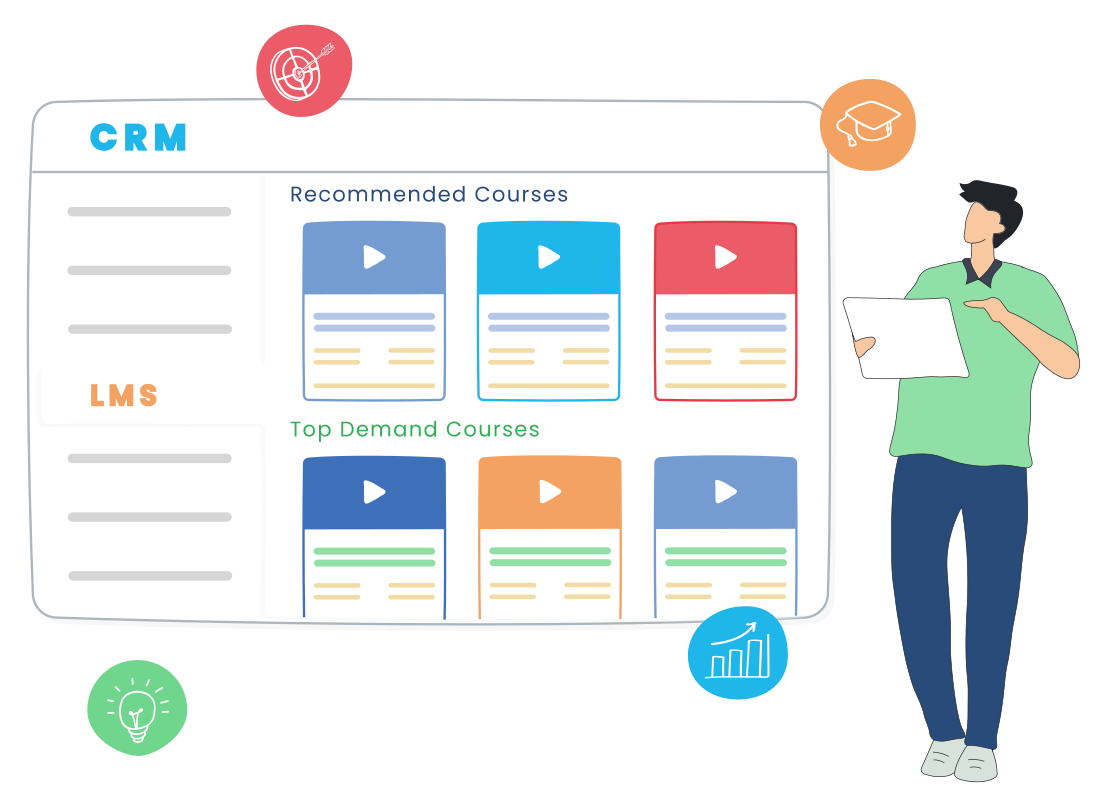
LMS (Learning management system) is an application that is used for providing e-learning courses and training programs. By integrating LMS into a CRM, you can deliver learning resources aligning with the customer's needs by looking at volumes of customer information stored in CRM.
This enables you to engage with your customers effectively and provide superior customer experience.
Why LMS integration in CRM is essential for business?
A CRM has the capability to capture and record in-depth customer information. By having LMS in CRM you can increase sales revenue, reduce customer churn and drive business growth. If you have an LMS integrated with Customer relationship management (CRM), you can

Deliver customized learning programs
The marketing team can provide personalized learning recommendations to customers. They can learn about your business by enrolling in training programs and gain extensive knowledge with less support or assistance.
Avail cross-selling and upselling opportunities
Sales reps can use e-learning programs for cross-selling or upselling opportunities. Also, a sales rep can identify learning accounts that have been inactive for a long time and make an effort to reach out to them.

Reduce repetitive customer queries
Customer support can minimize repetitive queries coming from customers when they have comprehensive knowledge about your business. In this way, you can reduce the hiring of support staff.

Implement skills to gain hands-on experience
Employees, customers, or partners can implement the skills they have learned from training programs directly in the CRM. For example, if you have courses about your product features, your users can log in to their CRM accounts and get a hands-on experience of each feature.

Automate enrollments using customer data in the CRM
You can initiate the enrollment process using the details provided in the CRM. For example, you can create an email template with a link to the learning platform with login instructions and send it to your users. This will reduce the manual effort of filling in user details and also saves time.
Allow single sign-on for login
You can permit a single sign-on to login to CRM and LMS by using one username and password. Users do not have to switch between screens to log in. By syncing CRM and LMS accounts, you can also view the learning records of users in the CRM.
Core Features of LMS in CRM
The features that make an LMS in CRM useful are not the same as those that make a standalone LMS useful. The value comes from how learning data interacts with customer data, not from how many course formats the platform supports. The features below are the ones that consistently determine whether the integration produces measurable results.
- Single sign-on across both systems: Users log in once and move between training and CRM workflows without switching credentials or duplicating profiles.
- Automated enrollment based on CRM triggers: Course enrollments fire automatically when a deal closes, a contact is tagged, a renewal approaches, or a support ticket pattern emerges.
- Course completion synced as CRM activity: Training milestones appear inside the customer record alongside emails, calls, and tickets, giving the full interaction history in one place.
- Lead scoring: Quiz scores, course progress, and certifications adjust lead scores automatically, helping sales prioritize prospects who show real intent.
- Personalized learning paths: Customer attributes such as industry, plan tier, or product usage map directly to course assignments without manual setup.
- Unified analytics: Reports combine training completion rates with deal velocity, support load, and churn data to show the actual business impact of education.
- Built-in payment gateway: Paid courses, certifications, and bundled training packages are sold and processed without leaving the CRM environment.
Benefits of Learning management system (LMS) in CRM
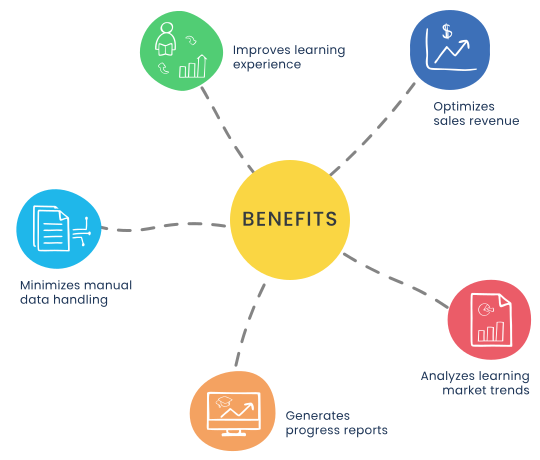
Improve learning experience by providing users with a single sign-in option. With information shared between CRM and LMS, users will get relief from keeping an additional set of login credentials. Deliver a social learning experience by allowing users to participate in online discussion forums.
Optimize sales revenue by providing personalized training recommendations based on historical data. By integrating LMS and CRM, you can simplify the payment process using integrated payment gateways.
Minimize manual data handling and automate enrollment processes.
Leverage CRM analytics to track learner performance and generate reports on the number of course registrations, quality of training, etc.
Understand the market trends from social media, sales conversations, etc., and deliver courses as per the demand.
How LMS in CRM Works (Step-by-Step)
LMS in CRM works by treating learning as another category of customer interaction, captured and acted on the same way as a sales call or a support conversation.
Step 1: Customer data flows into the LMS. The CRM holds the source of truth, including contact details, account information, deal stage, and segment tags. When a user is added to the CRM, that profile is automatically created in the LMS without manual entry.
Step 2: A trigger initiates enrollment. Triggers can include a closed-won deal, a new ticket category, a feature flag activation, or a date-based rule like a renewal window opening.
Step 3: The user accesses learning through a single sign-on. No separate login, no separate password, no duplicate user records. The learning experience appears within the same product environment.
Step 4: Learning activity flows back to the CRM. Every course view, completion, certification, and quiz score is logged against the customer record. Sales, support, and customer success teams see the same record with full context.
Step 5: CRM workflows respond to learning data. Course completion can trigger an upsell email, a satisfaction survey, a CSM follow-up, or a lead score adjustment. The system acts on training data instead of just storing it. With native AI CRM capabilities, this response layer also surfaces patterns automatically, such as flagging accounts whose learning velocity is dropping ahead of churn risk.
Step 6: Analytics combine both data sets. Reporting layers measure how training affects pipeline conversion, time to first value, support deflection, and net revenue retention.
How to Implement LMS in Your CRM
Implementation choices determine how much custom work the integration demands and how much value it delivers. There are three approaches, and the right one depends on technical capacity and how tightly the two systems need to operate together.
Native LMS module inside the CRM
This is the simplest path. The LMS is part of the CRM platform, sharing a single database, a single user list, and a single permissions framework. There is no integration to maintain because there is nothing separate to connect. Vtiger's LMS Add-on follows this approach, delivering training inside the same environment where deals, tickets, and contacts live.
Pre-built connector or marketplace integration
Many CRM and LMS platforms ship with native connectors that map standard fields between the two systems. This works well when both products are popular enough to justify a vendor-built bridge. Setup typically takes a few hours, with field mapping handled through configuration rather than code.
iPaaS or custom API integration
For teams running specialized LMS or CRM platforms, an iPaaS layer such as Zapier, Make, or Workato handles data flow via prebuilt triggers and actions. For complex workflows or proprietary platforms, a custom API integration becomes the right path, though it carries ongoing maintenance cost as either system updates its API.
Regardless of approach, every implementation should start with a clear list of the events that need to flow between systems and the data fields each event carries. Without that mapping, even the most expensive integration produces inconsistent results.
LMS vs CRM: Key Differences Explained
The two systems are often confused because both manage user records and both support customer-facing teams. The functional difference becomes clear when looking at what each system is optimized for, what data it holds, and which questions it is built to answer.
| Aspect | CRM | LMS |
|---|---|---|
| Primary purpose | Manage customer relationships | Manage learning and knowledge transfer |
| Core data structure | Accounts, contacts, deals, tickets | Learners, courses, modules, assessments, credentials |
| Update pattern | Continuous, driven by business events | Activity-based, driven by learner progress |
| Optimized for | Fast retrieval of current state | Reliable content delivery across formats and devices |
| Primary users | Sales, marketing, support, customer success | L&D teams, instructors, learners |
| Key questions answered |
|
|
| Success metrics | Pipeline value, win rate, retention, NPS | Course completion, certification rate, knowledge retention |
| Data lifespan | Recent and active records prioritized | Historical learning records preserved long-term |
LMS in CRM vs Standalone LMS Integration
There is a meaningful difference between an LMS that sits inside the CRM and an LMS that is connected to the CRM through an integration layer. Both deliver training, but the operational requirements, data behavior, and total cost of ownership are different in each model.
Native LMS in CRM
A native LMS uses the same database, user records, permissions, and workflow engine as the CRM. There is no synchronization process, no field mapping, and no separate admin layer to maintain. Course enrollments and completions are written directly to the customer record that already holds deals, tickets, and account history. Reporting works without additional setup because all the data is stored in one place.
Standalone LMS with CRM integration
A standalone LMS runs as a separate platform and exchanges data with the CRM through APIs, pre-built connectors, or middleware such as Zapier or Workato. The integration must be configured during setup and maintained as either system updates its API or schema. Sync delays or rule failures can cause records to become misaligne d between the two systems. Combined reporting requires a separate analytics tool or a manual data export.
Which approach fits which business
Organizations that already run a specialized LMS with advanced course authoring, SCORM compliance, or multi-language certification programs are usually better off integrating that LMS with the CRM. Organizations that want training as part of the same environment used for sales, support, and customer success are better served by a native LMS module. The choice depends on whether the LMS is a core product line in itself or a supporting capability around the customer relationship.
Key Use Cases of LMS in CRM
LMS in CRM is applied across the customer lifecycle, from the first product interaction to long-term retention. The use cases below show where the integration produces direct effects on revenue, retention, and operational efficiency.
Customer Onboarding & Product Training
The hardest part of onboarding is knowing which customers are at risk of disengaging before the relationship has even started. LMS in CRM converts learning data into early warning signals: a customer who completes module one within forty-eight hours behaves very differently from one who has not opened it after two weeks, and that difference correlates strongly with renewal outcome.
Customer success teams can build playbooks around these signals. A customer slowing down on advanced modules can be intercepted by a check-in call before the next billing cycle. A customer who finishes the full path early can be flagged for an expansion conversation, with the trigger handled automatically rather than relying on a CSM noticing it.
Sales Training & Enablement
Sales enablement programs typically fail at one specific point: the gap between training delivery and selling behavior. Reps complete a course on a Tuesday, then return to the same pitch they were running on Monday. LMS in CRM closes this gap by making training assignment situational rather than scheduled.
When a rep moves a deal into a stage that requires discovery, a discovery framework refresher appears within the deal itself. When a competitor is logged on an opportunity, the relevant battle card module is assigned automatically. When win rates drop for a specific product line, managers can push targeted training only to the reps whose numbers slipped, rather than running a generic team-wide session. A capable Sales CRM software layer is what makes this routing precise enough to actually change rep behavior.
Partner & Channel Training
Partner enablement breaks down when partners are treated like internal employees, with generic training paths and generic reporting. LMS in CRM addresses this by attaching learning records directly to partner accounts, so each partner organization carries its own certification status, program tier, and commercial entitlements based on what its team has completed.
Vendors can structure tiered access to deal sizes, product lines, or pricing privileges around certification milestones. A silver partner that completes the gold-tier certification path automatically unlocks gold-tier deal registration without manual review. Annual recertification can be enforced with reminder workflows triggered six weeks before expiry, giving partner organizations time to retrain before losing tier status. This level of structure is difficult to maintain when learning data lives outside the CRM, because the partner relationship itself is a CRM-managed entity.
Employee Learning & Development
Internal L&D teams have historically struggled with two problems: tying training to actual business outcomes, and keeping training current as roles and processes shift. LMS in CRM addresses both because the system already knows what the employee does, who they work with, and what their performance looks like.
New hire onboarding can be sequenced against their first ninety days of activity, with modules unlocked as they complete real tasks rather than fixed calendar dates. Role transitions trigger the right learning path automatically, eliminating the lag where someone takes on new responsibilities before being trained for them. Compliance-heavy industries benefit further: certification expiries are tracked against the employee record, with workflows that prevent customer-facing actions until requirements are renewed.
Customer Success & Retention Programs
Renewal forecasts are usually built on usage data and CSM judgment, both of which are lagging indicators by the time they raise alarm. Learning data sits earlier in the chain. A customer ignoring product depth modules in month four is often a customer building a business case to leave in month ten, and that signal shows up before any usage drop or executive change.
CS teams can use this earlier signal to restructure how renewals are managed. Accounts where learning engagement is sustained can be moved to a lighter-touch motion, freeing CSM time for accounts where engagement is dropping. Combined with Marketing automation in CRM, customers showing healthy learning velocity can be routed automatically into expansion campaigns, while disengaged accounts get retention-focused outreach instead. Working alongside a structured Customer success CRM program, learning behavior becomes the input that makes the rest of the model more accurate.
Best Practices for LMS in CRM Success
The technical setup of LMS in CRM is rarely what determines whether the program produces results. Implementations fail more often because of weak content discipline, unclear ownership, or poor learner experience design. The practices below focus on the program decisions that surround the technology.
Define what success looks like before building courses
Most LMS in CRM programs are built around content libraries first and outcomes second. This produces high course count and low business impact. The better order is to define the outcome, then design the curriculum to produce it.
- Tie each learning track to one specific business metric, such as time to first value, deal cycle length, or partner-sourced revenue.
- Set a measurable threshold for what completion should produce, such as a target reduction in support tickets or a target lift in expansion rate.
- Limit the number of tracks running at any time. Five well-designed paths consistently outperform fifty average ones.
- Audit existing content quarterly and retire courses that no metric depends on.
Assign content ownership outside the L&D function
A common failure point is treating the LMS as L&D's exclusive territory. The teams closest to the customer often have the most accurate content, but no incentive to write it.
- Make product marketing responsible for product modules, not L&D.
- Make customer success responsible for adoption and lifecycle modules.
- Make sales operations responsible for methodology and process modules.
- Keep L&D responsible for instructional design, format standards, and platform governance, not subject matter content.
Design for completion
Completion rates fall sharply once a module crosses fifteen minutes. Comprehensive courses look impressive in a course catalog and get abandoned in practice.
- Break content into modules of seven to twelve minutes each, with one clear outcome per module.
- Place assessments inside modules rather than at the end of full courses, so progress is captured even when learners do not finish a full track.
- Use video sparingly and never as the only format. Some learners absorb faster from text or interactive walkthroughs.
- Test mobile completion separately from desktop. Sales and field teams almost always learn on mobile, and most LMS content fails on small screens.
Build review cycles into the platform itself
Content goes stale faster than most teams plan for. Pricing changes, feature updates, competitive shifts, and process redesigns all break existing modules within months.
- Set a review cadence per content type. Product modules need quarterly review. Process modules need biannual. Methodology modules can stretch to annual.
- Tag every module with a content owner and a review date inside the LMS itself, so overdue content surfaces automatically.
- Run a feedback loop where learners can flag outdated content directly inside a module, with the flag routing to the content owner as a CRM task.
- Track content currency as a program metric, not just learner metrics.
Treat adoption as a separate project from rollout
Launching the platform and getting people to use it are two different problems. Most programs handle the launch well and the adoption poorly.
- Identify a small group of internal champions before launch, ideally one per team, and give them early access to shape the program.
- Communicate completion as a behavior to recognize, not just a compliance number to report.
- Avoid mandatory completion deadlines for non-compliance content. Forced enrollment without context produces low-quality completions.
- Schedule a thirty-day, sixty-day, and ninety-day adoption review with leadership, treating engagement gaps as program issues rather than learner issues.
Sign up for Vtiger for the best CRM with LMS Based Training
FAQs
LMS in CRM combines a learning management system and a customer relationship management system, where training data and customer data sit together. Businesses deliver courses, track progress, and act on learner behavior from the same record that holds deals, tickets, and activity history.
Yes, often more relevant for small businesses than enterprises. Smaller teams benefit from avoiding the overhead of two platforms. A built-in LMS module within a CRM for small businesses is among the most cost-effective ways to support onboarding, employee training, and partner enablement.
For many use cases, yes. If the goal is customer education, partner enablement, or role-based employee training, an LMS inside the CRM covers core requirements. Standalone platforms remain relevant for advanced course authoring, multi-language compliance training, or SCORM-based libraries that demand specialized depth.
LMS structures the early customer experience into defined, measurable steps. Customers progress through checkpoints instead of relying on scattered help content. CRM analytics and reporting at this stage shows which onboarding actions correlate with retention, allowing teams to refine the program with evidence.
It depends on the implementation path. A native LMS module needs no integration since both share one database. A connected LMS needs sync between user profiles, enrollments, and completion events. Teams can begin with Free CRM tools, while a CRM for startups usually fits better.
The strongest LMS systems in 2026 are platforms that unify learning with customer data rather than operating in isolation. Choices vary by use case across compliance training, partner certification, employee L&D, and customer education. Native LMS modules inside CRM platforms remain the most efficient for businesses prioritizing operational simplicity.
LMS stands for learning management system, software that delivers, tracks, and reports on training programs. It supports employee onboarding, customer education, partner certification, compliance training, and sales enablement. Examples range from standalone academic platforms to embedded LMS modules inside CRM systems where training and customer data live together.