Customers are the lifeblood of an organization and customer satisfaction can make or break a business. If they get quality service, they are more likely to return or recommend your business to others.
According to a Forbes report,
Organizations ignored 65% of customer emails. They researched an organization and found that of the 527 emails sent, only 147 received responses.
If you also fail to respond to your customer’s emails, it’s high time for you to start addressing that issue.
Why customer service is important
As mentioned above, excellent customer service can drive your business to success, while poor service can lead to lost sales, negative reviews, and a bad reputation. Also, with the prevalence of social media, bad customer service can spread like wildfire and impact the business among potential customers.
Yes, you can reach out to your customers in many ways, like social media, phone calls, etc. Still, email communication remains the most sought-after platform for carrying out professional communication. And, if you have email templates handy, it will be easy for you to draft an email quickly for different occasions.
How to enhance customer service with email templates
Building email templates for your business will not only save you time, but you can store it as well. Whether it’s a thank you email for subscribing to your newsletter or regular business communication, having customized templates can make you more efficient and productive.
What are the customer service templates that you must have for your business? Let’s look at it.
Top 4 customer service email templates for businesses
Here are a few service email templates you can keep in your email template repository. You can have templates for:
- Autoresponder emails: Auto-responder emails can help you answer your customers on time without causing any delay. For example, you can mention, “Our customer service team is working on the issue and will get back to you as soon as possible.” Building a template that mentions such information will make it easier for your customers to keep track of their problems getting resolved.
- Welcome emails: When your customers subscribe to your blogs or newsletters, you can send a welcome email to establish a meaningful customer relationship.
- Refund emails: All your customers will not be satisfied with your service and may ask for a refund. Create a template for refund emails acknowledging their refund requests.
- Customer feedback: When you have confirmed all customer issues are solved, you can set up a survey and take feedback from them. This gives you a brief idea of how your audience perceives your brand.
Vtiger CRM provides an easy solution to build email templates for different purposes. Using the Vtiger Add-Ons Publisher, you can build eye-catching email templates and publish them in Vtiger’s Marketplace.
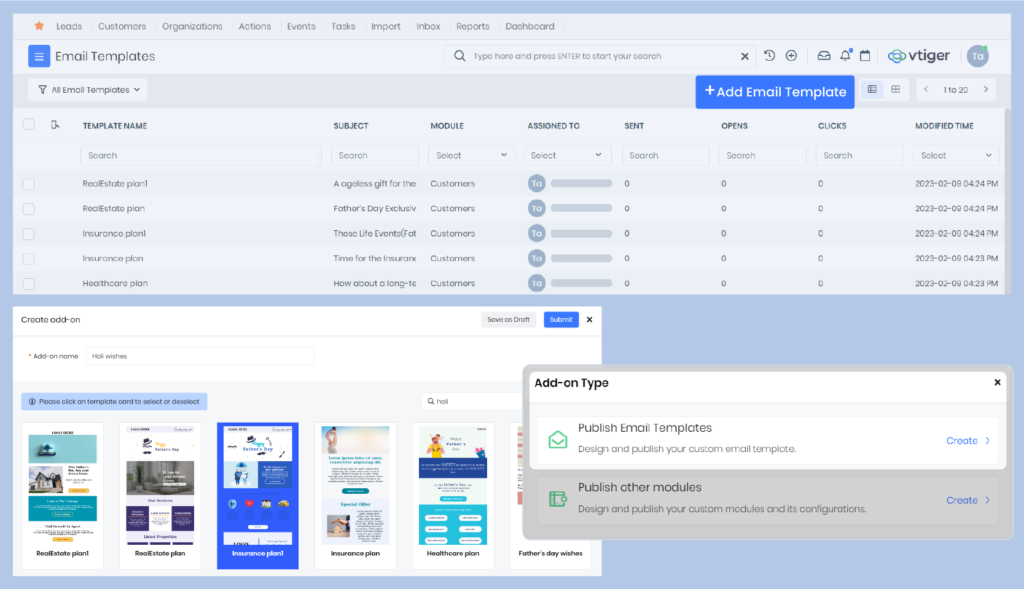
- First, you can craft your template using the Vtiger Email Templates module. You can choose to create from scratch or use existing templates from the library. Using drag and drop editor, you can also beautify your template with various elements.
- Second, once you have completed creating your signature templates, you can use Vtiger Add-ons Publisher to publish your templates. This platform will be of great use if you are a developer. This way, you can show your creativity and become a valuable resource in your organization.
Benefits of using customer service email templates
With email templates, you can:
Provide a personalized customer experience: You can customize your templates with different layouts, themes, backgrounds, and more. If you want to send a thank-you or refund-initiated email, you can personalize it accordingly within a few seconds.
Set up a face for your brand: With email templates, you can set up a face for your brand by adding brand colors, logos, fonts, etc., to help you build brand recognition. A well-designed email template can be visually appealing and add a sense of professionalism.
Save time: Customer reps can save time and increase response times with email templates. They will not have to draft the content from scratch every time, which is definitely a relief.
Do you want to build email templates for business?
Best Practices for Writing Customer Service Emails
Professional replies do more than answer questions. Strong customer service email templates build trust, reduce confusion, and show customers they are heard. Modern CRM systems like Vtiger allow teams to use placeholders, history tracking, and AI tone suggestions to make every email feel personal and accurate.
- Use real personalization: Customer names alone are not enough. Order history, previous tickets, and product details should appear naturally. CRM placeholders like {{First Name}} or {{Order ID}} help insert this automatically. A line such as “I see your order #45821 was delivered yesterday” shows awareness and builds confidence.
- Match the customer’s tone: The communication style should reflect the customer’s approach. Formal customers expect structured replies, while casual customers respond better to friendly language. AI assisted tone tools inside CRM systems help adjust wording without sounding forced.
- Use positive language: Negative phrases create friction. Instead of saying “We cannot process this today,” better customer service email response samples say, “We will process this tomorrow and keep you updated.” Focus stays on solutions, not limitations.
- Keep replies clear: Long paragraphs increase confusion, especially on mobile. Every email should focus on one outcome. Instructions should use bullet points or numbers. This improves readability and action speed.
- Set clear timelines: Vague words create anxiety. Specific timelines build certainty. Statements like “You will receive an update within 24 hours” improve customer confidence and reduce follow-ups.
- Use human signatures: Emails should come from real people, not generic departments. A closing line like “Sarah from Support” creates accountability and emotional connection.
Customer Service Email Templates by Category
These customer service email examples work best as starting structures. Every template should be adapted using CRM placeholders, customer history, and situation context. Customization prevents robotic replies and improves customer satisfaction.
General Customer Service Response Email Templates
Direct acknowledgment and gratitude define strong general responses.
Template Example
Subject: Update on your request {{Ticket ID}}
Hi {{First Name}},
Thank you for contacting us. I understand you need help with {{Issue Summary}}.
Here is what we found:
{{Solution or next step}}
Please reply if anything remains unclear. I will continue assisting you.
Sarah
Customer Support
This customer service email response sample confirms understanding and moves directly toward resolution.
Welcome & First-Response Email Templates
Immediate acknowledgment sets expectations and reassures customers.
Template Example
Subject: We received your request {{Ticket ID}}
Hi {{First Name}},
Your request has been successfully forwarded to our support team.
Ticket Number: {{Ticket ID}}
A support specialist will review this and respond within 4 hours.
You do not need to take any action now.
Sarah
Customer Support
This template confirms SLA commitment and prevents uncertainty.
Customer Complaint & Issue Resolution Email Templates
Complaint replies must calm emotions and show responsibility using the HEARD method.
Template Example
Subject: We are resolving your concern {{Ticket ID}}
Hi {{First Name}},
Thank you for bringing this to our attention. I understand how this situation affected your experience.
I sincerely apologize for the inconvenience.
Our team has taken these steps:
{{Resolution details}}
This will prevent future occurrences. Please let me know if you need further help.
Sarah
Customer Support
Empathy and action together restore trust.
Apology Email Templates for Customer Service
Ownership matters more than explanation.
Template Example
Subject: Our sincere apology and update
Hi {{First Name}},
I sincerely apologize for the delay in your order {{Order ID}}.
We have now prioritized your request.
To make this right, we have added:
{{Compensation}}
Your satisfaction remains important to us.
Sarah
Customer Support
Remedy strengthens recovery after service failure.
Delay & Follow-Up Email Templates
Silence damages trust. Proactive updates maintain confidence.
Template Example
Subject: Update on your request status
Hi {{First Name}},
I wanted to update you regarding your request.
Our technical team is carefully reviewing the issue.
Expected update time: within 24 hours.
Thank you for your patience while we complete this.
Sarah
Customer Support
Transparency reduces frustration.
Refund, Return & Cancellation Email Templates
Clarity prevents confusion during financial processes.
Template Example
Subject: Refund request confirmation {{Order ID}}
Hi {{First Name}},
Your refund request has been approved.
Refund timeline:
• Processing initiated today
• Bank transfer in 5 to 7 business days
You will receive confirmation once completed.
Sarah
Customer Support
Clear steps improve customer comfort
Order Confirmation & Status Update Email Templates
Customers expect reassurance after purchase.
Template Example
Subject: Your order is confirmed {{Order ID}}
Hi {{First Name}},
Your order has been successfully confirmed.
Tracking link: {{Tracking URL}}
Delivery estimate: {{Delivery Date}}
We are carefully preparing your shipment.
Sarah
Customer Support
Visibility increases trust.
Technical Support & Troubleshooting Email Templates
Precision and structure define strong technical replies.
Template Example
Subject: Troubleshooting steps for your issue
Hi {{First Name}},
Please try the following steps:
- Restart the application
- Clear browser cache
- Login again
If the issue continues, please share a screenshot.
Help guide: {{Help Link}}
Sarah
Technical Support
Structured guidance improves resolution speed.
Customer Feedback & Survey Request Email Templates
Respecting customer time increases response rate.
Template Example
Subject: Your feedback matters
Hi {{First Name}},
Your recent support experience matters to us.
This survey takes only 60 seconds:
{{Survey Link}}
Your feedback helps improve our service quality.
Sarah
Customer Support
Customer participation improves service.
Service Closure & Ticket Resolution Email Templates
Closure should remain open-ended for future help.
Template Example
Subject: Ticket resolved {{Ticket ID}}
Hi {{First Name}},
Your request has been successfully resolved.
I will close this ticket now.
You can reply at any time to reopen it.
Thank you for choosing us.
Sarah
Customer Support
Safety net reassurance prevents frustration.
Professional Customer Service Email Subject Line Examples
Subject lines determine whether emails get opened or ignored. Context clarity improves response speed.
Support examples
- Update on your request, Ticket 45821
- Action required for your support request
- Resolution completed Ticket 45821
Apology examples
- Our apology and update for your order
- Important update regarding your order
Feedback examples
- Share your experience with our support
- Tell us about your recent interaction
Subject lines under 50 characters perform better on mobile devices. Ticket numbers at the beginning improve tracking. Status markers like Update, Action Required, and Resolved improve clarity.
Tips to Customize Customer Service Email Templates
Effective customer service email templates work best when they sound human, not copied. The structure saves time, but the surrounding personalization builds trust. Modern CRM systems make this easier by combining templates with dynamic data, AI tone adjustment, and customer history.
- Use the personalized touch: A unique opening and closing should wrap the template body. The middle remains standard, but the start and end must feel personal. Lines like “I hope your week in Mumbai is going well” or “I see you have been with us for three years, thank you for your continued trust” create warmth without slowing down response time.
- Use CRM dynamic tags: Placeholders such as {{first_name}}, {{order_id}}, or {{last_interaction_date}} automatically insert real data. These tags enable customer service to scale sample email templates without losing personalization accuracy. CRM systems like Vtiger fill these instantly, reducing manual typing errors.
- Reference their situation: Customers notice when agents acknowledge their specific concern. A line such as “I understand the frustration you mentioned regarding the payment failure yesterday” proves the message was actually read. This prevents the email from coming across as automated.
- Adjust tone by persona: Tone should change based on who the customer is; a CEO expects short, formal, and outcome-focused replies, while a younger user may respond better to a friendly, conversational tone. This adjustment improves connection and response quality.
- Add visual help when needed: Complex issues often need visual explanation. Screenshots with arrows, short screen recordings, or direct help article links reduce confusion. Visual guidance resolves issues faster than text alone.
- Use AI tone adjustment: CRM integrated AI tools help rewrite replies when tone feels wrong. Agents can instantly convert a neutral reply into an empathetic or professional message. This improves emotional accuracy.
Customization ensures customer service email templates remain efficient without sounding robotic.
Common Mistakes to Avoid in Customer Service Emails
Templates improve efficiency, but careless usage can affect customer trust. Avoiding these mistakes keeps communication professional and reliable.
- Leaving placeholder tags: Emails that say “Hi {{Name}}” immediately show poor attention. A final review should always confirm that placeholders are filled correctly before sending.
- Partial answers: Customers often ask multiple questions. Replying to only one creates frustration and follow-ups. Every point from the original email must be addressed clearly.
- Using large text blocks: Long paragraphs reduce readability, especially on mobile devices. Bullet points and shorter sentences improve clarity and action speed.
- Using defensive language: Phrases like “As mentioned earlier” sound confrontational. A calm and helpful tone keeps the interaction positive.
- Giving unrealistic timelines: Templates promising one hour replies create disappointment if teams are overloaded. Templates should reflect actual response capacity.
- Personalization errors: Incorrect names, titles, or details reduce credibility. Careful proofreading protects trust.
- Broken links or missing attachments: Help article links and forms should be tested regularly. Broken links slow resolution and frustrate customers.
- Sounding overly corporate: Complex phrases confuse customers. Clear language works better. Saying “We are fixing the shipping issue” sounds more honest than technical jargon.
Proper customization and careful review ensure customer service email templates remain helpful, human, and professional.
FAQs on Customer Service Email Templates
What are customer service email templates?
Customer service email templates are prewritten response formats that help support teams reply faster, maintain consistency, and ensure professional communication across different customer service situations and requests.
Why should businesses use customer service email templates?
Businesses use customer service email templates to save response time, maintain consistent messaging, reduce agent workload, and deliver faster, more professional customer support experiences at scale.
How many customer service email templates should a business have?
Businesses should maintain 10 to 20 customer service email templates covering common situations such as complaints, refunds, welcome messages, technical support, follow-ups, and closure responses.
Can customer service email templates be customized?
Customer service email templates can be customized using CRM placeholders, customer details, tone adjustments, and context references to ensure replies feel personal, relevant, and human.
What makes an effective customer service email response?
An effective customer service email response clearly acknowledges the issue, uses positive language, provides a solution or a timeline, and maintains a polite, human, and professional tone.