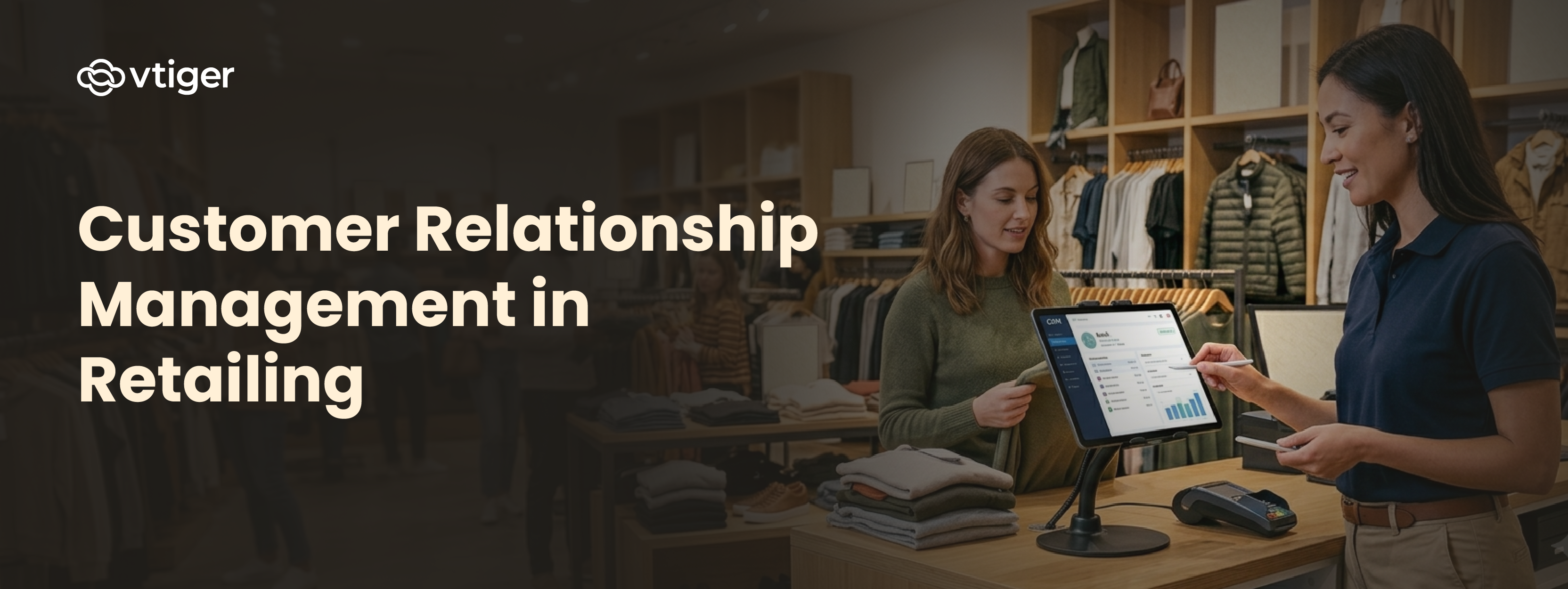
Customer relationship management in retailing is the practice of using CRM systems to manage customer data, personalise interactions, and coordinate retail customer engagement across every sales channel. Retailers use retail CRM to track purchase behaviour, automate campaigns, and manage loyalty programmes. Structured customer relationship management helps retail businesses increase repeat sales, reduce customer churn, and deliver consistent omnichannel experiences across stores, websites, and mobile apps.
Retail is one of the most interaction-intensive industries. Every purchase, support call, and marketing message is an opportunity to strengthen or weaken a customer relationship. Businesses that track and manage these interactions through customer relationship management in retailing are better positioned to retain customers and grow revenue than those that do not.
Read this blog to understand what customer relationship management in retailing involves, its practical use cases, and the best practices that determine long-term outcomes.
What is Customer Relationship Management in Retailing?
Customer relationship management in retailing is the use of CRM systems, data, and processes to manage every customer interaction across the retail lifecycle. It covers how data is collected, how interactions are tracked, and how that information is used to personalise communication and improve retention. Retail customer relationship management goes beyond contact records and email lists. It connects purchase history, loyalty data, support interactions, and marketing responses into a single customer view.
Retail CRM differs from general CRM due to the industry’s specific demands. High transaction volumes, seasonal demand, diverse customer segments, and the need for omnichannel retail CRM consistency make retail-specific configuration necessary. A standard B2B pipeline tool does not address loyalty management, in-store data capture, or the real-time personalisation that retail requires. CRM software built or configured for retail handles these requirements directly.
CRM for retail business operates across three core functions. First, customer data centralisation: all purchase history, preferences, and interaction records are stored in a single system accessible to all relevant teams. Second, personalisation: that data is used to send relevant messages and offers to individual customers at the right time. Third, performance measurement: every customer-facing action is tracked so that decisions are based on what is producing results.
Why CRM is Important in Retail
Retail businesses lose customers without knowing it. A customer who stops purchasing rarely announces it. Without retail CRM tracking purchase frequency, a lapsed customer looks the same as an active one until revenue has already been lost. Customer relationship management in retailing makes churn visible by flagging behavioural changes in time to act.
Customer experience in retail is directly shaped by how well a business knows each customer. When staff and systems have access to accurate purchase history at every service point, interactions are faster and more relevant. Customers do not repeat themselves. Recommendations reflect actual behaviour. That consistency builds trust and increases the likelihood of a repeat purchase.
Revenue per customer also improves with retail customer relationship management. Sales CRM and marketing teams working from shared data build cross-sell and upsell campaigns that target customers who are genuinely likely to respond. A campaign based on what a customer has actually bought converts better than a generic promotion sent to everyone.
Omnichannel retail CRM solves a structural problem that retail businesses face as they grow across channels. A customer who shops online, visits a store, and calls support should receive consistent service at each point. Without a connected CRM, each team operates from incomplete data. The customer experiences gaps. With omnichannel retail CRM, every interaction is visible to every team, regardless of the channel where it occurred.
CRM in retail industry also supports demand planning. Purchase data from specific customer segments shows which products are in demand and when, making stocking decisions more actionable than aggregate sales figures alone.
Key Features of Retail CRM Systems
Retail CRM software needs capabilities that go beyond the basics of contact management. The features below are the ones that matter most for retail operations.
1. Customer data management: Retail customer data management means maintaining one centralized profile per customer that includes purchase history, channel preferences, loyalty status, and all previous interactions. Every team accesses the same record. No data is duplicated or lost between departments.
2. Personalization and segmentation: Retail CRM allows businesses to segment customers by purchase frequency, average order value, product category, and location. These segments feed directly into campaign targeting. A campaign sent to a segment of customers who bought a specific category last season performs significantly better than a broad promotion.
3. Omnichannel communication: Omnichannel retail CRM consolidates interactions from email, SMS, in-store, and social channels into one system. Communication history is complete regardless of which channel was used, and every team can see the full picture at any point.
4. Loyalty and rewards management: Loyalty programme data is linked directly to individual customer profiles in the retail CRM. Points, rewards, and redemption history are tracked so that the impact of each incentive on retention behaviour is measurable and adjustable.
5. Analytics and reporting: Built-in analytics in retail CRM software cover customer lifetime value, churn risk, campaign response rates, and segment performance. AI CRM capabilities add predictive scoring that identifies which customers are likely to purchase next or disengage.
Use Cases of CRM in Retailing
CRM in retail industry is applied across marketing, sales, support, and inventory. Each function uses the same underlying customer data to produce specific outcomes.
Personalised Marketing Campaigns
Retailers use retail customer engagement data from the CRM to build campaigns around specific behavioural segments. A group of customers who purchased running shoes last quarter receives an early-access notification for new stock. A group inactive for 60 days receives a re-engagement offer. These sequences are built and automated through marketing automation tools within the CRM, and campaign performance is tracked against the same customer records that generated each segment.
Customer Retention and Loyalty Programmes
Retail CRM monitors each customer’s purchase cadence and triggers a re-engagement sequence when frequency drops below a defined threshold. Loyalty incentives are tied to individual CRM profiles. The impact of each reward type on subsequent purchase behaviour is tracked, so retailers can adjust which incentives they offer and to which segments they apply them.
Sales Optimisation
Purchase history data in the CRM identifies what customers regularly buy together and what they have not yet bought. This analysis informs cross-sell and upsell campaigns, product bundling, and staff recommendations at point of sale. Customer relationship management in retailing applied to sales decisions consistently increases average order value without increasing acquisition costs.
Customer Support and Service
When support interactions are logged in the CRM, agents immediately see the customer’s full purchase history, previous contacts, and loyalty status. This removes the need for customers to repeat background information and allows agents to focus on resolution. Improving customer experience in retail support this way reduces the rate at which service failures lead to permanent customer loss.
Inventory and Demand Insights
Purchase data from high-value customer segments in CRM in retail industry feeds directly into stock planning decisions. Retailers identify which products are bought most consistently by their most active customers and prioritise stocking accordingly. This reduces stockouts on high-demand items and avoids overstock on products that are not performing with the core customer base.
How to Implement CRM in Retail Business
A retail CRM implementation that skips planning tends to produce systems that staff do not use consistently and data that cannot be trusted for decisions. The steps below apply to first-time implementations and to businesses replacing an existing platform.
Step 1 – Define Business Goals
Before selecting any platform, define what the CRM needs to deliver. Goals may include reducing churn by a specific percentage, increasing repeat purchase rate, improving campaign conversion, or shortening support resolution times. Clear goals determine which features to configure first and how success will be measured. Implementations without defined goals expand in scope without producing results.
Step 2 – Choose the Right CRM Software
Evaluate retail CRM software based on the channels you operate, the integrations you need with POS and e-commerce systems, automation depth, and reporting requirements. The selection for a CRM for retail business should account for how the platform will scale as your customer base grows. An all-in-one CRM reduces tool fragmentation by keeping all customer data in one environment. Review CRM selection criteria carefully before committing to a platform.
Step 3 – Integrate Data Sources
Connect POS systems, e-commerce platforms, email tools, and support channels to the CRM so that customer data flows in automatically. Good retail customer data management starts at integration. Import historical purchase records, existing contacts, and loyalty history at the start to give the system an accurate foundation. Data that arrives incomplete at this stage will produce unreliable segments and inaccurate reports throughout.
Step 4 – Train Teams and Set Workflows
Role-specific training for sales, marketing, and support teams is what determines whether the system is actually used. Define what gets logged, when records are updated, and which processes are automated. Workflow automation reduces manual steps required from staff, which improves consistency and lowers resistance during the transition.
Step 5 – Personalise Customer Engagement
Build segmentation structures and automated campaign sequences once data is flowing and teams are using the system. Start with two or three segments based on clear purchase behaviour differences and measure results before expanding. Accuracy of retail customer engagement campaigns improves as more data accumulates and performance shows what is working.
Step 6 – Monitor and Optimise Performance
Review the KPIs defined in Step 1 on a regular schedule. Track campaign performance, retention rates, support resolution times, and data quality. Use AI CRM analytics to surface patterns that standard dashboards miss. Adjust segments and workflows based on what the data shows. Customer relationship management in retailing is an ongoing operational function, not a one-time configuration.
Benefits of CRM in Retailing
Retailers who implement and maintain CRM consistently see measurable improvements across customer retention, revenue, and operational efficiency.
- Enhanced customer experience in retail: Staff and systems deliver relevant, timely interactions at every touchpoint because they have accurate customer data. Customers do not repeat themselves and receive responses that reflect their actual history.
- Increased customer loyalty: Structured re-engagement campaigns and loyalty incentives tied to CRM profiles give customers consistent reasons to return. Retail customer relationship management applied to retention directly improves repeat purchase rates.
- Higher sales and revenue: CRM-informed cross-sell and upsell campaigns increase average order value. Automated re-engagement recovers revenue from at-risk customers before they stop purchasing.
- Better marketing ROI: Campaigns built on CRM segments consistently outperform broad promotions. Targeting customers by actual behaviour reduces wasted spend and improves conversion rates.
- Improved operational efficiency: Automating data entry, campaign scheduling, and reporting through retail CRM reduces manual effort across all teams.
- Stronger retail customer data management: Centralised, accurate customer data improves every downstream decision from stocking and pricing to staffing and promotion planning.
Challenges in Retail CRM Implementation
Data silos are the most common problem when implementing CRM in retail industry. POS systems, e-commerce platforms, and email tools each store customer data separately with no default connection. When these are not integrated into the retail CRM from the start, data arrives incomplete. Segments built on incomplete retail customer data management produce inaccurate campaigns and unreliable reports.
Staff adoption is the second major challenge. Teams accustomed to existing processes resist systems that add steps to their workflow. Configuring CRM software to mirror current processes before launch and providing role-specific training reduces this resistance. Automation that removes manual work further improves adoption rates.
Omnichannel retail CRM configuration is technically demanding. Tracking a customer accurately across online, in-store, and support channels requires all three to feed data into the same CRM record using consistent standards. Retailers who do not establish these data entry standards before go-live end up with duplicate records and channel-specific data that cannot be combined.
Data privacy compliance adds a planning requirement for any CRM for retail business. Retailers collecting and storing customer data must meet applicable regulations including GDPR and CCPA. Data governance policies covering consent, retention limits, and access controls must be defined at implementation.
Best Practices for Retail CRM Success
- Start with clean data: Mandatory fields, validation rules, and a data audit process from day one prevent retail customer data management problems that are difficult to correct later and affect every CRM function downstream.
- Design around the customer: Every CRM configuration decision should improve customer experience in retail, not just simplify internal processes. Systems designed around internal convenience produce processes that are efficient for staff but poor for customers.
- Use AI capabilities: AI CRM tools analyse behaviour patterns and generate personalised recommendations at scale. Retailers using predictive features deliver more relevant retail customer engagement without increasing staff workload.
- Align all customer-facing teams: Sales, marketing, and support must use the same retail CRM data and follow the same communication standards. Misalignment creates inconsistent customer experiences and data gaps that reduce CRM accuracy over time.
- Review segment performance regularly: Customer preferences shift. Segments built at implementation become less effective if they are not updated based on current data from the retail customer relationship management system.
- Treat CRM as an ongoing function: Customer relationship management in retailing is not a one-time project. Businesses that operate their retail CRM as a continuous discipline consistently outperform those that implement once and leave the system unchanged.
Frequently Asked Questions (FAQs)
Q1. What is CRM in retailing?
Customer relationship management in retailing is the use of CRM systems to manage customer data, personalise communication, and coordinate interactions across all retail channels. It covers purchase tracking, loyalty programme management, omnichannel retail CRM consistency, and customer support coordination within one connected system.
Q2. Why is CRM important for retail businesses?
Retail customer relationship management gives businesses the tools to retain existing customers, personalise marketing, and make operational decisions based on actual behaviour data. Without CRM for retail business, retailers have limited visibility into which customers are most valuable and what is driving or reducing their purchase frequency.
Q3. What features should a retail CRM have?
Retail CRM software needs centralised customer data management, purchase history tracking, behavioural segmentation, omnichannel retail CRM communication management, loyalty programme tracking, automated campaign execution, and analytics reporting. Integration with POS systems and e-commerce platforms is essential for accurate retail customer data management across all touchpoints.
Q4. How does CRM improve customer experience in retail?
CRM improves customer experience in retail by giving staff accurate customer histories at every service point. Customers receive personalised communication based on actual purchases. Support queries are resolved faster with full interaction context. Consistency across all channels removes the friction customers experience when different touchpoints hold different information about the same customer.
Q5. What are examples of CRM in retail?
A fashion retailer using CRM in the retail industry to send size-specific promotions based on past purchases. A grocery chain triggering re-engagement campaigns when purchase frequency drops. A home goods retailer automating post-purchase product recommendations. Each example applies structured customer data from the CRM to a specific revenue or retention outcome.
Q6. Is CRM useful for small retail businesses?
Yes. CRM for retail business is effective at any scale. Small retailers benefit from structured customer records, targeted campaigns, and retention tracking. Starting with contact management and basic automation through retail CRM software produces measurable improvements in repeat purchase rates without requiring large teams.
Q7. How do retailers use customer data in CRM?
Retailers use retail customer data management to segment customers by behaviour and value, build personalised campaigns, identify at-risk accounts, manage loyalty programmes, and measure promotion effectiveness. Retail customer engagement data is collected at every transaction and maintained in real-time profiles that inform all customer-facing decisions in CRM in retail industry.