AI has become a standard part of CRM software. Today, CRM vendors offer everything from AI-generated emails and conversation summaries to predictive lead scoring, forecasting, chatbots, and recommendations.
That creates a problem for buyers: if almost every CRM has AI, what actually makes one AI-native?
The answer is not simply the number of AI features a CRM offers. An AI-powered CRM can add valuable AI capabilities to an existing CRM. An AI-native CRM goes further: AI is considered as part of how the system handles data, understands context, supports workflows, surfaces signals, and helps users take action.
Why does the distinction matter?
The distinction matters because CRM systems are evolving from tools that primarily store customer information to systems that help teams understand what is happening, decide what deserves attention, and choose what to do next.
What Is an AI-Powered CRM?
An AI-powered CRM is a CRM platform enhanced with artificial intelligence capabilities.
A conventional CRM already helps businesses centralize customer information, manage interactions, track deals, run campaigns, handle support cases, and automate predefined processes.
AI can then be added to specific areas to make these activities more efficient.
Common examples include:
- Email generation: Drafting personalized sales or customer-service emails.
- Lead scoring: Predicting which leads are more likely to convert.
- Sales forecasting: Using historical data and current pipeline information to predict future sales outcomes.
- Conversation summaries: Turning calls, meetings, or long email threads into short summaries.
- Chatbots: Answering customer questions using business knowledge.
- Recommendations: Suggesting follow-ups, documents, or other actions.
- Content generation: Creating marketing messages, case responses, and other customer-facing content.
For example, an AI feature might analyze a sales opportunity and assign it a score. Another feature might summarize the salesperson’s latest conversation with the prospect.
These capabilities can deliver substantial value. In fact, AI-powered CRM is already helping teams reduce repetitive work and make better use of the information stored in their CRM. Vtiger’s Calculus AI, for example, offers deal scoring, next-best-action recommendations, best-time-to-contact suggestions, and email assistance.
What Is an AI-Native CRM?
AI-native CRM is designed around AI as a core part of the system rather than treating it as a collection of features added to an existing CRM.
The term “AI-native” is increasingly used to distinguish systems where AI influences the architecture, workflows, user experience, and the way the system processes information. IBM similarly describes AI-native systems as those where AI is a core component rather than something bolted on later.
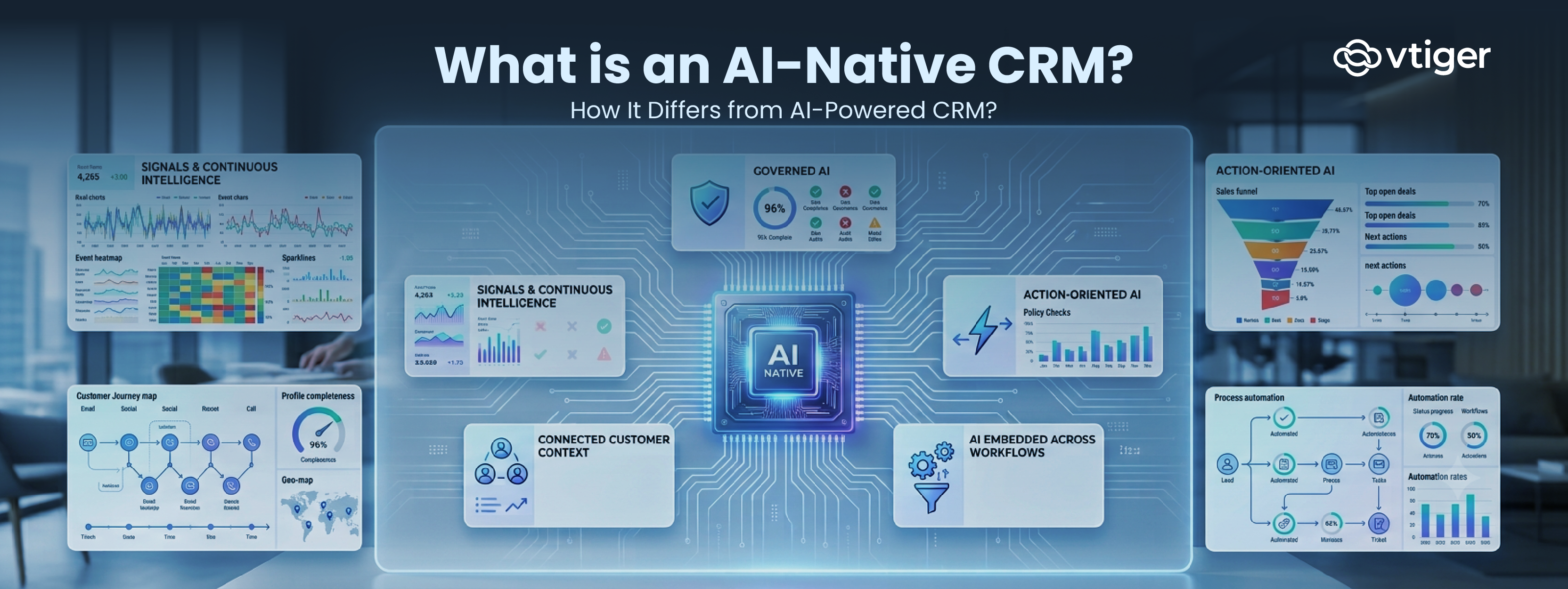
To understand this better, let’s go through the characteristics of AI-native CRM:
1. Connected customer context
An AI-native CRM should work with connected customer information rather than treating every interaction as an isolated data point. Data can include contacts, organizations, deals, cases, campaign interactions, and customer history.
Consider a salesperson preparing for an important customer meeting. A basic AI tool might summarize the latest email. A CRM with broader context can consider the customer’s previous conversations, open opportunities, support cases, engagement history, and other relevant information.
This is also why unified CRM data matters. Vtiger’s CRM tools guide explains how CRM systems centralize customer data and interactions across business functions.
2. AI embedded across workflows
AI-native CRM is not necessarily about giving users another chatbot window. Instead, AI should appear where work already happens. For instance, a salesperson viewing a deal could see a risk signal or a deal score, while a support rep working on a case could receive a summary of previous interactions, suggested responses, and other historical data.
The objective is to make AI part of the workflow rather than making employees move between the CRM and a separate AI tool.
3. Signals and continuous intelligence
Generic CRMs often require users to look for information. A salesperson may have to open a pipeline report to identify stalled deals. A customer-service manager may have to review cases to identify recurring issues. However, an AI-native CRM may identify signals such as a deal becoming inactive, support concerns, and reduced customer engagement
Vtiger’s AI-based deal scoring is an example of how CRM signals can identify potential deal outcomes.
4. Action-oriented AI
AI-native CRMs can take proactive steps to achieve a business goal rather than just suggesting what to do. For example, instead of simply telling a sales rep that a deal has gone quiet, AI could detect prolonged inactivity, draft a personalized follow-up email, and create a task for the rep to look into the matter further.
This is closely related to the evolution toward agentic CRM, where AI agents can reason through business context and perform multi-step tasks within defined boundaries.
5. Governed AI
The more deeply AI participates in business processes, the more important governance becomes. An AI-native CRM should operate within the organization’s existing controls, including user permissions, data-access rules, and security protocols. This is particularly important when AI can do more than generate text.
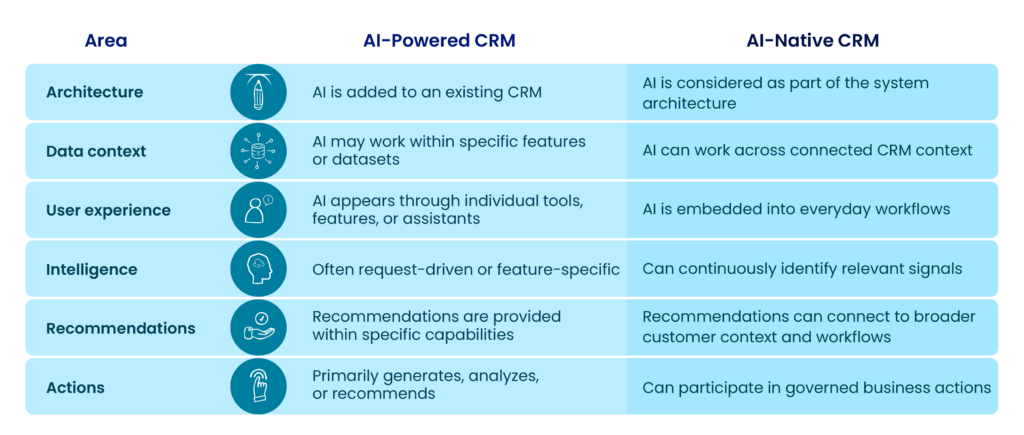
AI-Powered CRM vs AI- Native CRM: The Key Differences
The difference becomes clearer when you compare the two approaches directly.
Real-World Use Case: Managing a Sales Deal
Consider a sales opportunity that has been sitting in the pipeline without meaningful activity for several days.
Traditional CRM
The salesperson needs to:
- Review the deal.
- Check recent activities.
- Read relevant emails.
- Look at the customer’s history.
- Determine whether the deal is at risk.
- Decide what to do next.
- Write a follow-up.
- Create a reminder or task.
AI-powered CRM
AI can assist with individual parts of the process.
It might:
- Summarize recent emails.
- Generate a follow-up email.
- Provide a deal score.
- Forecast the likelihood of closing.
- Recommend a next action.
This reduces manual work and helps the salesperson make a decision.
AI-native CRM
An AI-native CRM can connect these capabilities into a broader workflow.
It can:
- Detect inactivity.
- Review relevant conversations.
- Trigger a risk signal.
- Recommend the next action.
- Draft a personalized follow-up.
- Create a follow-up task.
- Request approval before sending the email.
- Update the CRM after the action is completed.
The important difference is not one particular AI feature.
It is that data, intelligence, recommendations, workflows, and actions can operate as connected parts of the same system.
Vtiger’s recent NextGen platform is positioned as a metadata-driven platform that allows businesses to build composable apps around specific business needs. This approach makes it possible to build AI-native CRM apps where business data, workflows, AI agents, and actions work together within the same application.
Why Does AI-Native Architecture Matter?
AI becomes more useful when it has the right context and access to the processes where decisions are made. It can work with a broader picture of the customer relationship rather than relying on isolated prompts or individual datasets.
AI-native CRMs can provide more relevant recommendations. Such as:
- A generic AI assistant might suggest: “Follow up with the customer.”
- An AI-native CRM may provide a more useful context like: “The customer has not responded to the proposal for five days. Consider sending a short follow-up email focused on the proposal.”
Does AI-Native Mean Autonomous CRM?
No.
This is one of the most important distinctions to make. AI-native does not mean handing complete control of the CRM to AI. Instead, it operates autonomously within defined boundaries. AI may summarize the meeting for you or create an outstanding email template. But it still requires human assessment to make important business decisions.
What Should Businesses Look for in an AI-Native CRM?
The term “AI-native” can easily become another technology buzzword.
Instead of relying on a vendor’s label, buyers should evaluate what the system can actually do.
Here are 10 questions to ask.
1. Can AI use context across sales, marketing, and support data?
Look beyond isolated AI features. Determine whether AI can work with information across customer-facing functions.
2. Can it understand customer interactions and activities?
AI should work with relevant conversations, activities, records, and history, not just structured fields.
3. Can it proactively identify risks and opportunities?
Ask whether AI can provide important signals or whether users must always ask for an analysis first.
4. Can recommendations connect directly to CRM actions?
Recommendations become more valuable when users can act on them without leaving their workflow.
5. Can AI participate in workflows and automation?
Look for integration between AI capabilities and the CRM’s existing business processes.
6. Does AI respect existing user permissions?
AI should not become a backdoor to information a user would otherwise be unable to access.
7. Are important AI actions auditable?
Businesses should be able to understand what happened, particularly when AI performs or initiates actions.
8. Can administrators control how much autonomy AI receives?
Different tasks require different levels of human involvement.
9. Can AI capabilities extend as business processes evolve?
A useful AI architecture should not be limited to a fixed collection of AI features.
10. Is AI integrated into everyday CRM workflows?
Finally, ask whether employees can use AI where they already work or whether they have to leave the CRM and switch to another tool.
This checklist can help businesses distinguish genuine AI integration from a CRM that simply has an AI feature list.
What Does an AI-Native CRM Mean for the Future of CRM?
The emergence of AI-native CRM does not mean traditional CRM capabilities become irrelevant.
Customer data still needs to be stored accurately. Processes still need to be structured. Teams still need workflows, permissions, reporting, automation, and governance.
What changes is the role AI plays on top of those foundations.
Instead of AI being limited to individual features, it can become increasingly connected to:
Data → Context → Signals → Intelligence → Recommendations → Workflows → Actions
This creates the possibility of a CRM that doesn’t simply tell employees what has happened but helps them understand what matters now and what they can do next.
Frequently Asked Questions (FAQs)
What is an AI-native CRM?
An AI-native CRM is a CRM designed with AI as a core part of its architecture and workflows. It can use connected customer context to identify signals, provide recommendations, assist with processes, and participate in business actions.
What is the difference between AI-powered and AI-native CRM?
An AI-powered CRM generally adds AI capabilities to an existing CRM, such as email generation, lead scoring, forecasting, or summaries. An AI-native CRM integrates AI more deeply into data, workflows, user experiences, intelligence, and actions.
Is an AI-native CRM fully autonomous?
No. AI-native does not necessarily mean fully autonomous. AI can assist, recommend, prepare actions, or execute specific tasks within defined permissions and business rules. Human approval can remain necessary for important actions.
Why is connected data important for AI-native CRM?
AI needs context to provide useful recommendations. Connected information across contacts, deals, conversations, activities, cases, campaigns, and other business data can give AI a more complete understanding of the customer relationship.
Is AI-powered CRM still useful?
Absolutely. AI-powered CRM can deliver significant value by automating repetitive tasks, generating content, analyzing information, making predictions, and supporting employees. The difference is the depth of AI integration, not whether one approach has value and the other doesn’t.