CRM systems store a wealth of customer information, from sales conversations and purchase history to marketing engagement and support requests. However, this information doesn’t automatically tell employees what to do next.
A sales rep may notice that a deal has been inactive for two weeks. A support agent may see repeated complaints from the same customer. A marketing team may observe increased engagement with a product but little response to its campaigns. Each situation presents an opportunity to act, but deciding on the right response requires context.
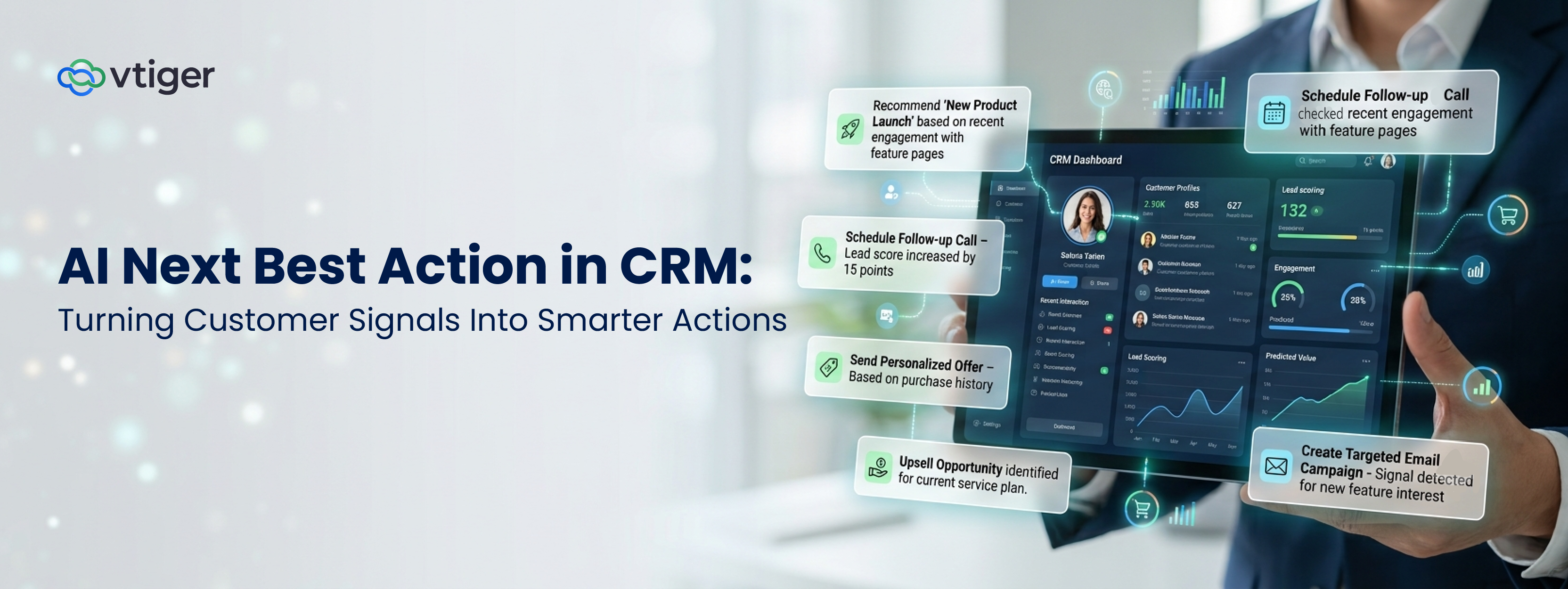
This is where next best action in CRM becomes valuable. By analyzing customer data, identifying meaningful signals, and interpreting the current situation, AI can offer next best action recommendations or the most relevant next step for an employee or team.
Instead of asking users to search through records and figure out what deserves attention, a CRM can help them understand what is happening, why it matters, and what they can do about it.
The result is a more proactive approach to customer relationship management, where information supports timely decisions rather than simply documenting past activity.
What Is Next Best Action in CRM?
AI next best action in CRM, or next best action recommendation is an AI-or rules-driven capability that recommends the most relevant action to take based on customer information, business context, and the situation at hand in a CRM,
The recommendation could involve following up with a prospect, addressing an unresolved customer concern, contacting a customer before renewal, or prioritizing a sales opportunity.
For example, consider a sales opportunity with the following characteristics:
- The deal has been inactive for 14 days.
- The salesperson has not scheduled another meeting.
- The decision-maker has not been identified.
- The latest conversation indicates concerns about implementation.
A traditional CRM may show these details, leaving the salesperson to decide what to do next. A next-best-action feature can connect these signals and recommend identifying the decision-maker, addressing the implementation concern, and scheduling a follow-up meeting.
The key difference is that the system doesn’t just report what happened. It helps the employee decide what to do about it.
This is an important step in the evolution of the AI-native CRM approach, where AI can work with customer context and business workflows to support decisions at the point where they matter.
How Does AI Next Best Action Work?
Each stage contributes to the final recommendation’s quality.
1. Collect relevant customer data
The CRM provides the information needed to understand a customer or business situation. This may include contact details, deal stages, customer conversations, emails, meetings, purchase history, support cases, and marketing interactions.
The goal is not to analyze every available data point indiscriminately. It is to identify the information relevant to a particular decision.
2. Identify meaningful customer signals
AI examines changes and patterns that may indicate an opportunity, risk, or need for intervention.
For example, declining engagement combined with an approaching renewal may indicate that a customer needs attention. A visit to a pricing page, a product demonstration, and a recent request for a proposal may indicate stronger buying interest.
3. Interpret the situation
Individual signals do not always tell the whole story. AI needs to consider the surrounding context before suggesting a response.
A deal inactive for two weeks may be at risk. However, the customer may have told the salesperson that the purchasing decision will be delayed until next quarter.
Considering both details can produce a more appropriate recommendation than relying on inactivity alone.
4. Recommend the next step
Once the system interprets the available information, it can recommend an action that fits the situation.
Examples include scheduling a meeting, addressing an objection, escalating a support case, or coordinating with another team before contacting a customer.
5. Capture the outcome
The employee can accept, edit, defer, or dismiss the recommendation, depending on the system’s capabilities. If the action is completed, the outcome becomes part of the customer history.
Over time, this feedback helps businesses evaluate the usefulness of recommendations and improve their decision-making.
Why Customer Signals Matter for Next Best Action
Customer signals provide the evidence a CRM uses to identify what may require attention. Without meaningful signals, next-best action recommendations risk becoming generic reminders that don’t reflect the customer’s actual situation.
The value often comes from combining signals rather than evaluating them separately.
For instance, a customer visiting a pricing page may indicate interest. But if the customer also has an unresolved support issue and has stopped responding to sales emails, immediately sending a promotional message may not be appropriate.
A next-best-action system can help teams consider the wider relationship before deciding what to do.
This closely relates to customer intelligence, where AI predicts customer behavior and identifies what matters, then translates that into next-best-action recommendations.
Next Best Action Use Cases Across Marketing, Sales, and Customer Service
Next best action is not limited to sales recommendations. Any business function that relies on customer context and recurring decisions can benefit.
Next Best Action in Marketing
Marketing teams often rely on predefined campaigns and customer segments. But customers do not always follow the expected journey, and the next campaign message may not be the best response to their behavior.
Consider a prospect who has engaged with several product pages, attended a webinar, and entered an active sales opportunity. At the same time, the prospect has not responded to recent promotional emails.
Rather than sending another campaign message automatically, AI could recommend coordinating with the salesperson to understand the prospect’s current needs.
Next Best Action in Sales
Sales reps often manage multiple opportunities at different stages. Reviewing each record, reading previous conversations, identifying risks, and deciding on the next step can consume considerable time. With the next best action feature, it becomes easier to reach a conclusion.
Suppose a high-potential lead shows less engagement. Instead of flagging it as risky, AI next best action could recommend a follow-up with the lead via email or a product demo to give a walkthrough of the product. When the sales rep receives a practical course of action, it helps them determine what to do next.
Next Best Action in Customer Service
Customer service teams need to resolve issues efficiently while maintaining a positive customer experience. However, a case’s priority or status may not fully reflect its urgency.
For example, a customer has contacted support three times about the same issue. The latest message expresses frustration, and the case is approaching its SLA deadline.
The CRM could recommend escalating the case, assigning an agent, or preparing a response to acknowledge the issue. This helps the support agent understand why the case deserves attention and what action may be appropriate.
Read what more AI in CRM can do for your business apart from the next best action feature by exploring AI CRM use cases
Should AI Automatically Execute the Next Best Action?
Not every recommendation should be executed automatically. The appropriate level of autonomy depends on the action’s risk, business impact, and the organization’s policies.
A useful way to approach this is through four levels.
- Suggest: AI recommends a next step, such as identifying a missing decision-maker.
- Prepare: AI drafts an email, creates a proposed task, or assembles the information required for the next step.
- Approve: An employee reviews the recommendation and confirms whether it should proceed.
- Automate: The system executes an approved action when configured rules, permissions, and conditions are satisfied.
For example, creating an internal reminder may be suitable for automation. Sending a sensitive customer communication or making a significant commercial commitment may require human review.
Businesses should define who can approve actions, what information AI can access, and which activities can be executed automatically.
This approach aligns with the NIST AI Risk Management Framework, which provides guidance for managing risks associated with developing and using AI systems.
How to Measure the Impact of Next Best Action
The number of recommendations generated is not, by itself, a reliable measure of success. Businesses need to understand whether those recommendations lead to better decisions and measurable improvements.
The right metrics depend on the business problem being addressed.
| Area | Metrics to track |
| Marketing | Engagement, conversions, journey progression, retention |
| Sales | Deal progression, win rate, sales cycle length, pipeline quality. |
| Customer Service | First response time, resolution time, SLA adherence, customer satisfaction. |
| Customer Success | Renewal rate, customer retention, adoption, time to intervention. |
| Employee Productivity | Recommendation acceptance, actions completed, time saved. |
Businesses should establish a baseline before implementation and compare results after introducing the capability.
They should also examine recommendation quality. A high acceptance rate may indicate relevance, but it does not automatically mean the recommendations are improving business outcomes. Similarly, a dismissed recommendation may still have been useful if it prompted an employee to review a risk.
The key is to connect recommendation activity to the results the business wants to achieve.
The Future of CRM: From Recommendations to Intelligent Applications
Next best action represents an important step in CRM’s evolution. Traditional CRM records customer activity, analytics explains patterns, predictive AI estimates potential outcomes, and next best action recommends what employees should do next. Agentic AI can extend this process by coordinating and executing tasks within defined boundaries.
This is where Vtiger NextGen takes a broader approach. It is an AI-native, metadata-driven platform where businesses can build composable applications for their specific requirements and extend AI functionality within them.
Businesses can combine data, workflows, AI agents, and actions to build applications that support their processes, rather than limiting AI to a fixed set of CRM features.
Frequently Asked Questions (FAQs)
What is next best action in CRM?
Next best action in CRM is an AI- or rules-driven recommendation that identifies the most relevant action to take based on customer data, business context, and current circumstances. Examples include following up with a prospect, escalating a support case, or contacting a customer before renewal.
How does AI determine the next best action?
AI can analyze customer records, interactions, engagement patterns, deal information, support history, and other relevant signals. It interprets these details to recommend an action that fits the situation, which can then be reviewed or executed according to the organization’s rules.
What is an example of next best action in sales?
If an opportunity has become inactive, lacks a decision-maker, and has no follow-up meeting scheduled, a CRM may recommend identifying the buyer and arranging a discovery meeting. The recommendation helps the salesperson address the issues effectively.
Can next best action be used in customer service?
Yes. AI can recommend escalating a case, assigning a specialist, preparing a response, or following up with a customer. These recommendations can consider the customer’s history, repeated issues, sentiment, case priority, and approaching SLA deadlines.
Does next best action mean AI makes decisions automatically?
No. Next best action usually refers to a recommendation, not necessarily automatic execution. Depending on the system and its configuration, AI may suggest an action, prepare it for review, or initiate an approved workflow under defined permissions and business rules.