A CRM for lead management centralizes customer information, automates repetitive tasks, and helps sales teams track every lead from first contact to conversion. Features like automated lead assignment, follow-up reminders, pipeline tracking, and lead scoring reduce manual work, improve response times, and ensure no opportunity slips through the cracks.
High lead volume is a great opportunity, but handling 1,000+ prospects without software slows your entire sales process down. Spreadsheets quickly become messy, leading to duplicate records, missed follow-ups, and delayed replies to your best prospects. At this scale, the key to winning deals is speed. A CRM automatically sorts, scores, and assigns incoming leads, giving your reps the time and clarity to focus on active buyers while their interest is highest.
What Is CRM for Lead Management?
A CRM for lead management is a system that captures, organizes, tracks, and prioritizes every lead in one place, from first touch to closed deal. It goes beyond basic contact management by adding the automation and scoring that make high lead volumes workable.
Basic contact management stores names and numbers. A lead management system handles the entire workflow by capturing leads from every channel, recording each interaction, scoring leads by readiness, assigning them to the right rep, and displaying the whole pipeline at a glance. That combination is what lets a small team stay on top of thousands of leads without drowning in manual work.
Why Managing Large Volumes of Leads Becomes Difficult
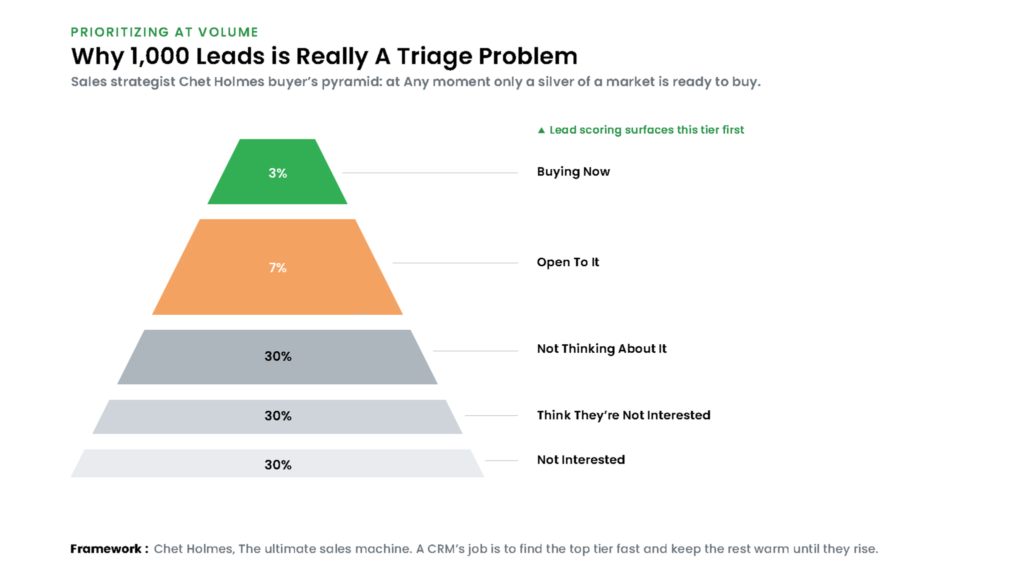
The trouble with volume is that effort does not scale the way lead count does. Manual data entry, delayed follow-ups, duplicate records, unclear ownership, and thin pipeline visibility each cost minutes per lead, and across a thousand leads those minutes become lost days, lower conversion, and a worse experience for the buyer waiting on a reply.
Two realities make lead management more challenging. First, speed matters. A Harvard Business Review study found that companies responding to online leads within an hour were nearly seven times more likely to connect with a decision-maker than those that waited just one hour longer.
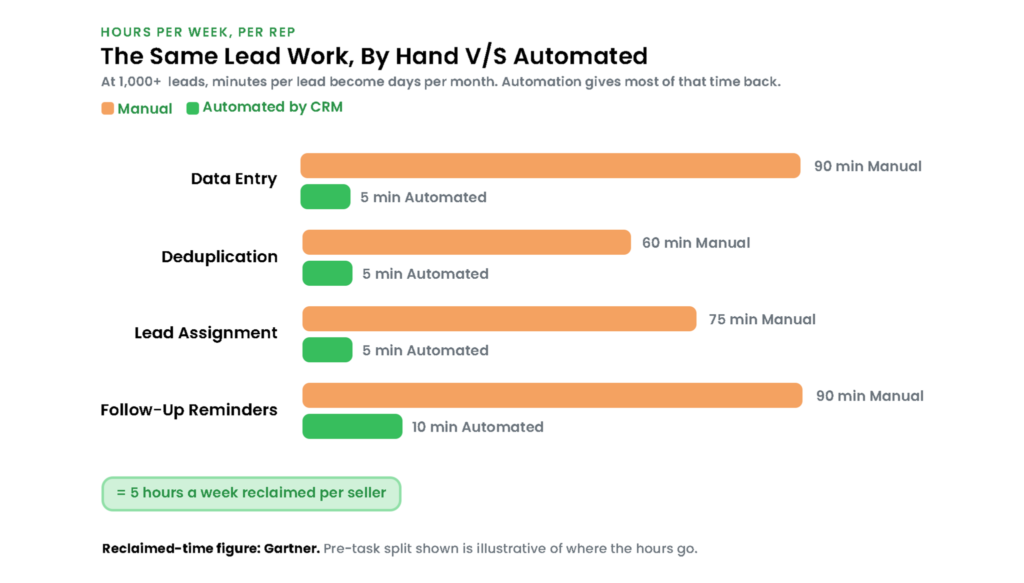
Second, not every lead is ready to buy. Sales strategist Chet Holmes illustrated this through the buyer’s pyramid: at any given time, only about 3% of a market is actively looking to purchase, while the remaining prospects are at different stages of their buying journey. Treating all 1,000 leads the same means spending valuable sales time on the wrong opportunities instead of focusing on those most likely to convert.
Prioritizes High-Quality Leads
How a CRM Simplifies Lead Management
A CRM consolidates all leads into a single platform, so the team can prioritize opportunities, automate repetitive tasks, and follow up consistently throughout the sales cycle. Six capabilities do the heavy lifting at volume.
Centralizes All Lead Information
Contact details, communication history, activities, and documents live on one timeline per lead, so anyone can pick up a conversation without hunting through inboxes or asking a colleague what was said.
Automates Lead Capture
Vtiger Webforms, email, live chat, social channels, and third-party integrations send new leads straight into the CRM, deduplicated on arrival, so nothing is retyped and no inquiry waits in a channel nobody checks.
Assigns Leads Automatically
Round-robin, territory, and rule-based routing built in the Process Designer send each lead to the right rep in seconds. Faster assignment is the first lever on response time, and response time is what the HBR data rewards.
Tracks Every Sales Interaction
Calls, emails, meetings, tasks, and notes attach to the lead on their own, building an activity timeline that shows exactly where every lead stands without anyone calling a status meeting.
Prioritizes High-Quality Leads
This is where volume becomes manageable. Lead scoring ranks leads by fit and buying intent, and Vtiger’s Calculus AI predicts and recommends next actions from conversation analysis, surfacing the roughly 3% ready to buy now so reps spend their hours where deals actually close.
Improves Follow-ups with Automation
Task reminders, email sequences, and workflow automation keep every lead moving without a person remembering to nudge it, which is where most of the hours-per-week savings come from.

Essential Features to Look for in a Lead Management CRM
Evaluate a lead management CRM by how reliably it performs with thousands of leads, not just a test group.
| Feature | What to demand at scale |
| Multi-channel lead capture | Auto-import and deduplication from web, landing pages, email, and social |
| Lead scoring and qualification | Behavioral and demographic scoring that surfaces sales-ready leads |
| Sales pipeline management | A visual pipeline with clear deal stages and progress tracking |
| Workflow automation | Auto-assignment, follow-up reminders, notifications, and approvals |
| Reporting and analytics | Lead-source, conversion, and pipeline reports you can act on |
Strong sales pipeline management paired with clean reporting turns the pipeline from a guess into a forecast you can plan around.
Benefits of Using a CRM for Lead Management
Optimizing lead management gives reps hours back every week to focus on active buyers. Gartner found that AI saves sellers nearly five hours a week, and automated lead handling is a large part of that reclaimed time. The rest of the gains follow:
- Saves hours of manual work each week by automating capture, deduplication, and follow-up.
- Eliminates duplicate records that inflate lead counts and quietly waste rep time.
- Improves lead response times, the single strongest predictor of whether a lead converts.
- Increases conversion rates by concentrating effort on the leads most ready to buy.
- Standardizes the sales process so every lead follows the same qualified steps.
- Gives complete visibility across thousands of open leads in one pipeline.
- Improves collaboration through shared ownership inside one CRM for sales teams.
- Enables data-driven decisions from lead-source and conversion reporting.
- Scales with growth, handling ten thousand leads as cleanly as one thousand.
Best Practices for Managing Leads with a CRM
Technology enables scale, but execution drives conversion. Following key best practices ensures your CRM remains effective as your pipeline grows.
- Define lead qualification first: Agree what a sales-ready lead looks like, so scoring and routing act on one shared standard.
- Automate the repetitive work: Capture, deduplication, assignment, and reminders should run without a human, freeing hours for selling.
- Respond fast: Alert a rep the moment a high-score lead arrives, while the intent behind it is still fresh.
- Keep data clean: Merge duplicates and update records on a schedule, since scoring and reports are only as reliable as the data beneath them.
- Review pipeline reports regularly: Watch conversion by source and stage, and decide where AI fits best using a view of which business cases suit AI.
- Train the team on the CRM: Consistent data entry and real adoption are what turn the system from overhead into leverage.
Frequently Asked Questions
What is CRM for lead management?
A CRM for lead management is software that captures, organizes, tracks, and prioritizes leads from first contact to closed deal. It centralizes lead data, automates repetitive tasks like assignment and follow-up, and scores leads by readiness, so sales teams can handle high volumes without losing opportunities.
How does a CRM help manage large volumes of leads?
It removes manual work that doesn’t scale. The CRM auto-captures and deduplicates leads, routes them to the right rep in seconds, tracks every interaction, and scores leads so teams focus on the ones ready to buy. That triage is what makes a thousand leads workable.
Can a CRM automate lead assignment?
Yes. Most lead management CRMs support round-robin, territory-based, and rule-based assignment, so new leads reach the right rep automatically within seconds. Faster assignment shortens response time, which directly improves the odds of reaching and converting a lead.
What features should a lead management CRM include?
Prioritize multi-channel lead capture with deduplication, lead scoring and qualification, visual pipeline management, workflow automation for assignment and follow-up, and reporting on lead source and conversion. Together, these capture, triage, and track high lead volumes with minimal manual effort.
How does lead scoring work in a CRM?
Lead scoring assigns points based on demographic fit and behavior, such as email opens, page visits, and form fills. Leads that cross a threshold are flagged as sales-ready. AI-based scoring goes further, predicting intent and recommending next actions so reps work the most promising leads first.
Is CRM for lead management suitable for small businesses?
Yes. Small teams feel volume pressure fastest, since a few people cannot manually track hundreds of leads. Many CRMs offer affordable or free starting tiers, letting a growing business automate lead handling early and scale the same system as lead volume increases.
How can CRM improve lead conversion rates?
By improving speed and focus. The CRM shortens response time through automated routing and alerts, surfaces the highest-intent leads through scoring, and keeps follow-ups consistent through automation. Reaching the right leads faster, more often, lifts conversion without adding headcount.