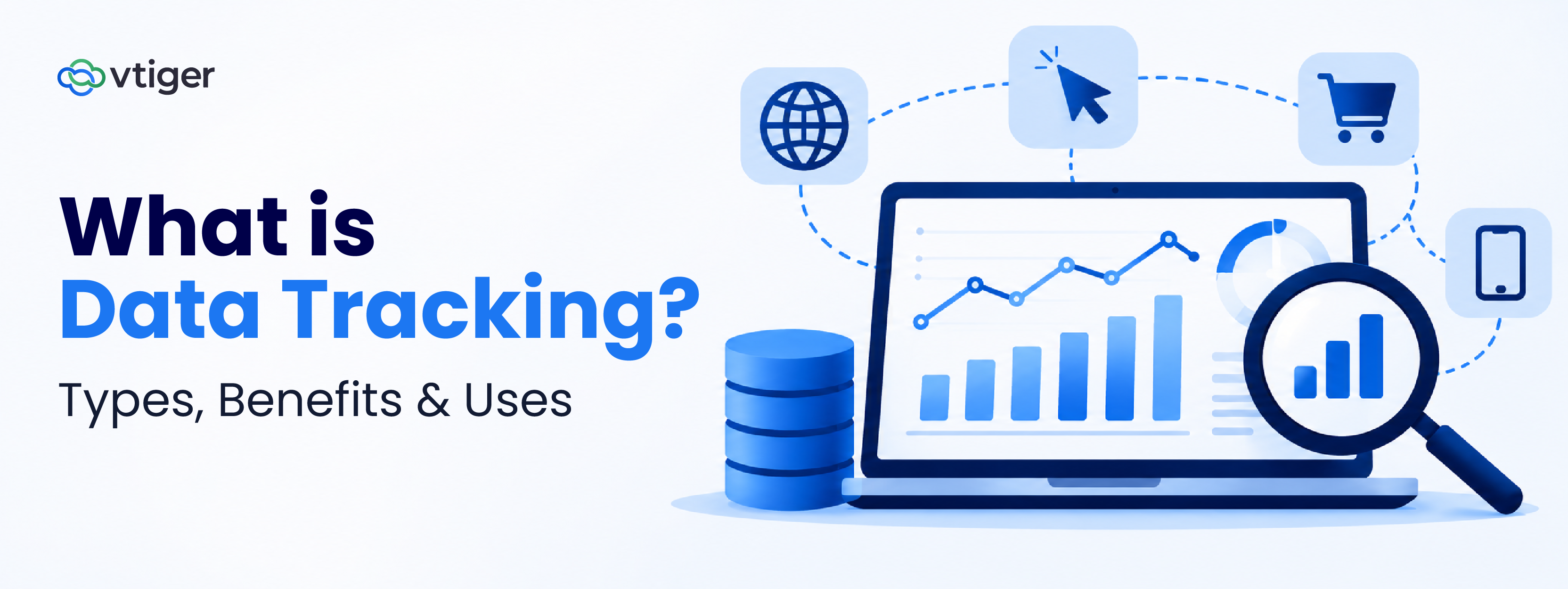
Data tracking is the process of collecting and monitoring information over time to understand activities, behaviour, and performance. Businesses use data tracking to monitor customer interactions, measure key performance indicators, identify trends, and make informed decisions. Common types include website, customer, sales, marketing, and operational data tracking, supported by tools such as analytics platforms and CRM systems.
A sales manager is asked on Monday how many deals will close this quarter. The numbers exist, but they are across three spreadsheets, two inboxes, and one rep’s memory, so the honest answer is a guess. The same thing happens when marketing person is asked which campaign produced paying customers, or when support is asked why response times slipped.
Data tracking fixes this by recording the same measures, in the same way, every day. Any change then shows up as a trend instead of a surprise, and performance reviews stop turning into arguments about whose numbers are right.
Accelerate Business Growth with Vtiger
15-day free trialNo credit card requiredFull product access
Almost there!
Redirecting you to your free trial…
What Is Data Tracking?
Data tracking is the structured, repeated recording of specific data points, such as page visits, deal stages, or support tickets, so a business can see how they change over time. The key word is repeated: tracking measures the same thing in the same way, on a schedule or continuously, which is what makes comparison possible.
The data comes from systems people already use, including website analytics, a CRM, email platforms, billing tools, and support software. It is collected as events happen, organized into consistent fields, monitored against targets, and then analyzed for patterns. Because every record carries a date, a business can compare this month with last month, or one team with another. Tracking, monitoring, and analytics are related but not interchangeable.
Term | Question it answers | What it produces |
|---|---|---|
| Data tracking | What happened, and how has it changed? | A consistent, dated record of chosen measures |
| Data monitoring | Is anything outside the expected range right now? | Alerts and dashboards checked against thresholds |
| Data analytics | Why did it happen, and what should we do about it? | Explanations, forecasts, and recommendations |
Tracking supplies the data that the other two depend on, and analytics is the step that interprets it. A business that records lead sources.
Recording the detail, not only the total, is what lets a business find patterns. That difference between recording the detail and recording only the total is what lets a business find patterns and measure performance against a target.
Types of Data Tracking
Businesses track five main types of data: website, customer, sales, marketing, and operational. Most track all five in some form. What separates them is whether the five connect, because a website visit, a sales call, and a support ticket only tell a story when they attach to the same customer.
| Type | What it tracks | Example measures | Usually recorded in |
|---|---|---|---|
| Website | Visits, pages, and visitor paths | Sessions, page views, conversion events | Web analytics tool |
| Customer | Interactions, preferences, and history | Purchase history, retention rate, support contacts | CRM |
| Sales | Leads, deals, and pipeline | Win rate, sales cycle length, pipeline value by stage | CRM |
| Marketing | Campaign response and lead generation | Click-through rate, cost per lead, lead-to-customer conversion | Marketing platform and CRM |
| Operational | Processes and workflow performance | Task completion rate, turnaround time, backlog | Project, ticketing, or workflow tools |
Website Tracking
Website tracking records how visitors find and use a site, from the first page view to the final action. It answers whether the pages built to attract and convert people are working.
Teams use it to decide which pages and traffic sources deserve more investment. The usual failure is counting visits without matching them to the enquiries they produce, so traffic can rise while revenue stays flat.
Customer Tracking
Customer tracking builds a history of each customer’s interactions, so every team can see what has already happened before the next conversation starts.
It tells a business when to follow up, renew, or intervene before a customer leaves. The common fault is keeping the history in several tools, so the team that calls next does not know about an open support case.
Sales Tracking
Sales tracking records where every lead and deal stands, who owns it, and what has happened to it since the last update. A rep’s notes tell a manager what one person remembers, while a tracked pipeline tells the whole team what is true. Dedicated sales tracking software automates much of this activity capture.
Marketing Tracking
Marketing tracking connects campaign activity to the inquiries and customers it produces, so spend can be judged by outcomes rather than activity.
Marketers use tracking to decide where to spend next, but the hard part is linking a campaign to revenue months later. That link only works when the lead’s source is recorded at the moment the lead is created.
Operational Tracking
Operational tracking measures how work moves through the business, from a support ticket opened to an invoice paid.
How Does Data Tracking Work?
Data tracking works as a five-step loop. Define what you want to know, identify where the data originates, collect and organize it, monitor and analyze it, and use the findings to change something. The loop repeats because every change creates new data to check.
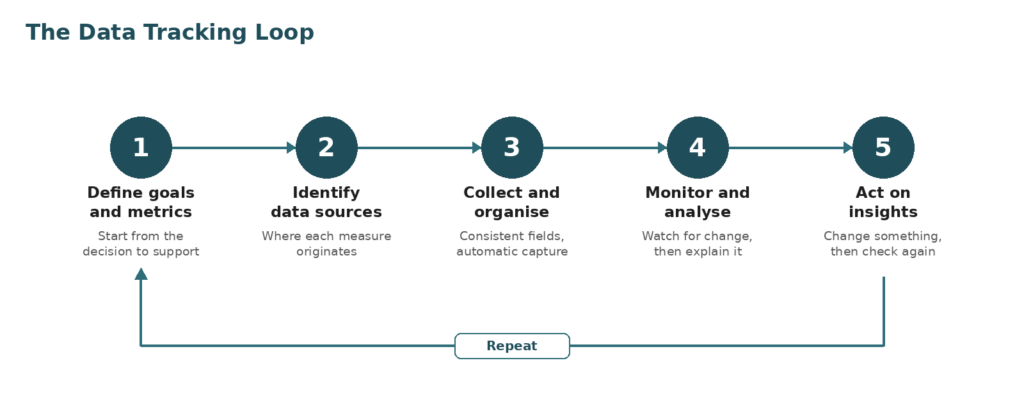
Figure 1. The five steps of data tracking, repeating as results feed new decisions.
One example runs through the steps below: a services firm that wants more of its website inquiries to become booked meetings.
1. Define Tracking Goals and Metrics
Start with the decision the data should support, then pick the smallest set of measures that informs it. For the services firm, the goal is more booked meetings, so the metric is the share of inquiries that become a meeting. Without a stated goal, tracking tends to collect whatever is easiest to count.
2. Identify Relevant Data Sources
List where each measure originates. The inquiry arrives through a website form, the follow-up happens by email and phone, and the outcome is recorded by a sales rep. That makes three sources, and each needs a clear owner and a way to link its records to the same person.
3. Collect and Organize Data
Collection should be automatic wherever possible, because manual entry introduces gaps. Form submissions create a record in the CRM with the source captured as a required field, and deal stages use fixed names. Consistent fields are what allow records from different weeks and different people to be compared.
4. Monitor and Analyze the Information
Once data flows in, the firm reviews the inquiry-to-meeting rate weekly and splits it by source. The analysis shows that inquiries from one channel almost never book. Monitoring catches a drop quickly, and analysis explains why it happened.
5. Use Insights to Improve Decisions and Performance
The firm shortens its follow-up window and moves budget away from the weak channel. It then keeps tracking the same metric to confirm the change worked. Acting on the result is the step most often skipped, and it is the one that turns tracking into improvement.
Benefits of Data Tracking
The main benefits of data tracking are better decisions, a clearer view of customer behaviour, measurable sales and marketing results, earlier warning of trends and gaps, and more efficient operations. Each follows from the same cause: decisions rest on a consistent record instead of recollection.
- Better decisions. A manager choosing between two campaigns can compare their tracked results instead of relying on instinct or the loudest opinion.
- Clearer customer behavior. Recorded interactions show what customers buy, ask about, and ignore, so teams respond to evidence, not assumptions.
- Measurable sales and marketing. Tracked conversion rates and cost per lead show which channels and reps return the most for the effort.
- Early warning. A slow decline in response time or renewals becomes visible months before it shows up in revenue.
- Efficient operations. Tracking turnaround times and backlogs points to the specific step where work waits.
The link between tracking and performance is documented. McKinsey’s 2013 DataMatics survey of 400 top managers at large international companies, published in 2014. It found that intensive users of customer analytics were 23 times more likely to clearly outperform competitors in acquiring new customers and nine times more likely to do so on customer loyalty.
The survey measured association rather than cause, and it covered large companies, but the direction is consistent: firms that act on customer data tend to outperform those that do not.
Common Data Tracking Methods and Tools
Businesses track data with five common methods: website analytics tools, CRM systems, marketing analytics platforms, spreadsheets and dashboards, and automated tracking and reporting systems. Most companies combine several, because no single tool sees website visits, sales conversations, and campaign spend at once.
| Method or tool | Best suited to | Main limitation |
|---|---|---|
| Website analytics tools | Visitor traffic, behaviour, and conversion events on a site | Sees anonymous visits, not what happens after a lead becomes a customer |
| CRM systems | Customer, lead, deal, and support activity tied to named records | Tracks only what is entered in it or connected to it |
| Marketing analytics platforms | Campaign response across email, ads, and social channels | Strong on engagement, weaker on closed revenue unless linked to sales data |
| Spreadsheets and dashboards | Small datasets, one-off analysis, and shared summaries | Manual upkeep and version drift as volume grows |
| Automated tracking and reporting systems | Recurring metrics that feed scheduled reports and alerts | Depend on clean inputs and clearly defined metrics |
Businesses choose between these by answering three questions. What decision must the data support? Where does the data originate, and who owns that system? Who needs the report, and how often?
A team whose questions are about sales follow-up needs a system that records sales activity, not a more elaborate website tool. A team whose questions are about campaign cost needs marketing data joined to revenue. The goal decides the tool, and choosing in the opposite order tends to produce dashboards nobody uses.
Where the same customer appears in several tools, it helps to understand how CRM systems work as the place where those records join up. CRM automation can then handle the repetitive capture and reporting.
How Businesses Use Data Tracking
Businesses use tracked data for four recurring jobs: understanding customer behavior, measuring sales performance, evaluating marketing campaigns, and monitoring overall business performance. Each job begins with a different question, and each answer comes from records that were kept consistently over time.
How to understand Customer Behaviour?
By recording how customers interact over time, including purchases, support contacts, and responses to messages, then look for patterns. A support team that sees the same question repeated across many accounts can fix the product page or the documentation, which improves the experience for everyone who follows.
How to measure Sales Performance?
By tracking. Obtain sales leaders pipeline visibility, lead conversion rates, and a record of activity such as calls, emails, and meetings. If deals consistently stall at the proposal stage, the data points to the stage to coach, rather than to a vague sense that the team is underperforming. Good lead management depends on this record.
How to evaluate Marketing Campaigns?
By connecting each campaign to the engagement and conversions it produced. Comparing cost per lead and lead-to-customer conversion by campaign shows which spend creates customers and which only creates activity.
How to monitor Business Performance?
Leadership tracks KPIs against goals set at the start of the period, then looks at the gaps. A revenue target that is behind plan becomes a specific question: is the pipeline short, is conversion falling, or are deals slipping? CRM metrics organise these indicators so that each team measures the same thing.
Data Tracking Challenges and Best Practices
Most tracking problems come from five causes: inaccurate data, privacy risk, too many metrics, disconnected systems, and data that nobody reviews. Each cause has a practice that prevents it.
Maintaining Data Accuracy and Consistency
Duplicate records, free-text fields, and inconsistent stage names make trend lines unreliable. Enforce required fields and fixed picklists at entry, and agree one definition for each metric before any report is built.
Privacy and Sensitive Data
Tracking customer data creates obligations under laws such as the EU’s GDPR, California’s CCPA, and India’s Digital Personal Data Protection Act, 2023. Collect only the data a defined purpose requires, record consent where the law demands it, limit access to the people whose roles need it, and delete data when its purpose ends.
Choosing Relevant Metrics Rather Than Tracking Everything
Tracking every available number produces dashboards that no one reads. Tie each metric to a decision and an owner, and retire any metric nobody uses.
Integrating Data From Different Systems
When website, sales, and support data are held in separate tools, nobody can follow one customer from first visit to renewal. Connect the systems through integrations that map fields deliberately, and use a shared customer identifier, such as an email address or account ID, so that records join up.
Reviewing Data Regularly and Acting on Insights
Data that is collected but never reviewed becomes an archive. With CRM automation, set a fixed review rhythm, weekly for operational metrics and monthly for strategic ones, and record what action each review produced. Regular review also catches silent failures, such as a form that stopped sending leads.
How CRM Supports Business Data Tracking
CRM software supports business data tracking by recording customer and sales activity in one system, against named customer records, so that leads, deals, and interactions can be followed and reported on over time. It does not replace website analytics or financial systems, but it holds the customer and sales data that most business decisions depend on.
Centralizing Customer and Interaction Data
A CRM replaces scattered spreadsheets and inboxes with one record per customer that collects calls, emails, deals, tickets, and notes. A CRM is built around a single customer view, letting sales, marketing, and support work from the same history.
Tracking Leads, Deals, and Sales Activities
Each lead and deal moves through defined stages, and the system records who handled it and what changed. In Vtiger One, a deal keeps a single timeline of interactions, updates, and stage changes, and stages can require specific actions before an opportunity advances, which keeps pipeline data honest.
Monitoring Customer Engagement and Account Activity
Because interactions attach to the account, teams can see which customers are active, which have gone quiet, and which have open support cases. Quiet accounts and rising case volumes become signals to act on, instead of surprises at renewal time.
Generating Reports to Support Business Decisions
Tracked records are only useful if they can be summarised. Vtiger One reports can be built as pivot tables, detail reports, and charts, and its performance insights summarise team activity, deals, backlogs, and support SLA performance for sales and support managers.
Where a CRM Needs Other Data Sources
A CRM tracks what happens inside it and what connects to it. Website behavior, advertising spend, and accounting data still need their own sources, so the practical aim is to connect them to the customer record rather than to expect one tool to track everything.
Where to Start
The gap between tracking that helps and tracking that clutters is rarely the tool. It is whether each measure belongs to a decision and an owner. If you are starting from nothing, choose one decision that matters this quarter, such as which inquiries become meetings, define the single metric that informs it, and name the person who reviews it each week. Add further metrics only when that one is producing action.
Frequently Asked Questions (FAQs)
What is data tracking used for?
Businesses use data tracking to monitor customer interactions, measure sales and marketing performance, follow operational efficiency, and spot trends early. A support team might track ticket resolution time, while a sales team tracks deal stages. In each case, the same measures are recorded repeatedly, so you can compare changes and act on them.
What are the main types of data tracking?
The five main types are website tracking, customer tracking, sales tracking, marketing tracking, and operational tracking. Website tracking covers visitor behavior, customer tracking covers interaction history, sales tracking covers leads and deals, marketing tracking covers campaign results, and operational tracking covers process and team performance.
What tools are used for data tracking?
Common tools include website analytics platforms, CRM systems, marketing analytics platforms, spreadsheets with reporting dashboards, and automated reporting systems. The right choice depends on the goal, where the data originates, and who needs the reports. Most businesses combine two or three rather than relying on a single tool.
What is the difference between data tracking and data analytics?
Data tracking records chosen measures consistently over time, while data analytics interprets those records to explain results and guide decisions. Tracking answers what happened and how it changed, and analytics answers why it happened and what to do next. Analytics is only as reliable as the tracking that feeds it.
How does data tracking help businesses?
Data tracking helps businesses replace guesswork with a consistent record. Teams can see which campaigns produce customers, where deals stall, and which processes run slowly. That evidence supports faster, better-justified decisions, and it makes progress against goals measurable instead of a matter of opinion.
Is data tracking the same as monitoring?
No, the two differ: tracking records data over time, while monitoring watches that data against thresholds to flag problems as they occur. A business tracks daily sales calls, for instance, and monitors for a sudden drop below an agreed level. Monitoring depends on tracking, but tracking can exist without any alerts.
How can businesses track customer data securely?
Collect only the data a clear purpose requires, restrict access by role, encrypt sensitive fields, and keep an audit log of who views or changes records. Record consent where the law requires it and honour deletion requests. Regular access reviews catch permissions that outlive the roles they were granted for.