Omnichannel commerce is a way of selling in which a business’s website, app, physical stores, marketplaces, and messaging channels share the same customer, product, and order data. A shopper can start on one channel and finish on another without repeating themselves. Orders, stock levels, and customer history stay consistent wherever the sale happens.
A shopper adds a jacket to a basket on their phone, then walks into the store to try it on. The assistant cannot see the basket, the loyalty points do not appear, and the website says the size is sold out while a rail in the shop holds three.
Omnichannel commerce is designed to remove those gaps. It connects the places a business sells so the customer, the stock, and the order look the same in each, making the shopper’s journey feel like one conversation instead of several.
It is not a product you can switch on. Software supports it, but the real work is agreeing where customer, stock, and order data live and making every channel use them. Businesses reach it in stages, usually by connecting two channels first.
Accelerate Business Growth with Vtiger
15-day free trialNo credit card requiredFull product access
Almost there!
Redirecting you to your free trial…
What Is Omnichannel Commerce?
Omnichannel commerce is not the same as selling in many places. A business is omnichannel only when its channels exchange information, so a return started online can be completed in store and loyalty balances match everywhere. The practical test is whether a shopper can start in one place and finish in another with nothing lost.
In omnichannel retail, the channels typically include a website, a mobile app, physical stores, marketplaces, social media, and messaging apps such as WhatsApp. The word commerce matters because it puts the focus on selling, meaning orders, stock, and fulfillment, rather than on messaging alone.
Two neighboring terms often cause confusion. Omnichannel marketing aims for consistent messaging across channels. Omnichannel CRM concentrates on customer relationships and conversation history.
A single purchase shows how the pieces fit together. A shopper sees a coat on a brand’s social media post, checks the website to find whether their size is in stock at the nearest shop, and messages that shop on WhatsApp to reserve it. They pay and collect in store, and the loyalty points arrive in the app that evening. Figure 1 traces the journey and shows what must carry over at each step.
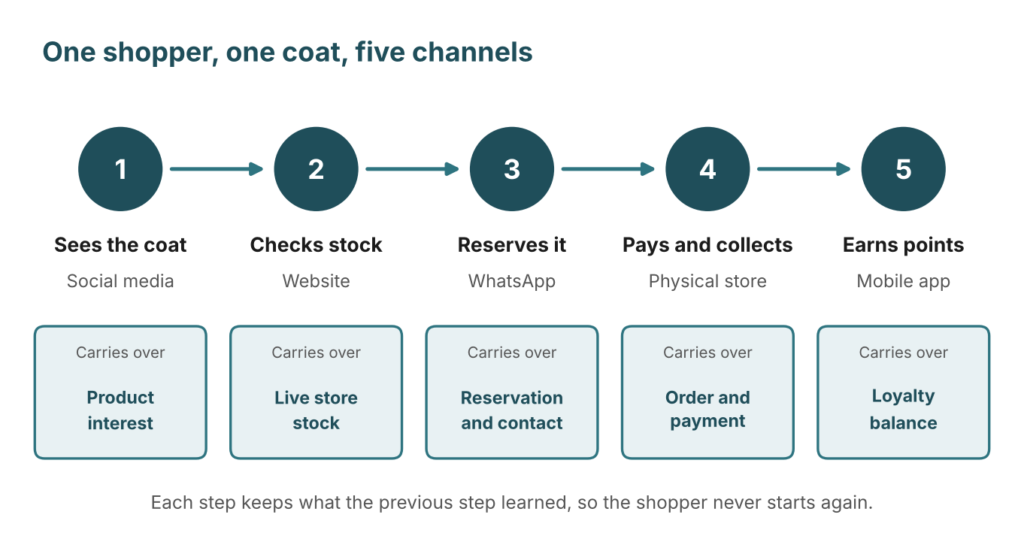
Figure 1. A single purchase crosses five channels, and each step keeps what the previous step learned.
If any step forgets what happened before it, the shopper has to start again. That is the gap a connected approach closes.
Omnichannel vs Multichannel vs Single-Channel Commerce
Single-channel commerce sells through one channel. Multichannel commerce sells through several channels that run separately, each with its own data. Omnichannel commerce sells through several channels that share data, so customers, stock, and orders look the same everywhere. The difference between the last two is not how many channels a business has, but whether they are connected.
The table compares the three models side by side.
| Aspect | Single-channel | Multichannel | Omnichannel |
|---|---|---|---|
| Channels | One, such as a shop or a website | Several, run separately | Several, connected |
| Customer data | Held in one place | Split by channel | Shared across channels |
| Stock and orders | One set of records | Separate records per channel | One view of stock and order status |
| Shopper experience | Simple but limited | Inconsistent between channels | Consistent, with freedom to switch channels |
| Typical example | A market stall with no online shop | A shop whose website keeps its own stock count | A shop where web orders can be collected or returned in store |
Some vendors also use the term unified commerce. It usually means one platform running every channel from a single back end, while omnichannel can join separate systems through integrations. For most small businesses, the goal is the same: one version of the customer, stock, and orders.
Omnichannel is not always the right next step. A business with one shop and an occasional online order may gain little from connecting systems that rarely interact. The omnichannel vs multichannel decision becomes clearer when customers regularly switch channels, when stock is shared between channels, or when service teams keep asking shoppers to repeat order details.
How Omnichannel Commerce Works
Omnichannel commerce works by putting a shared data layer beneath every sales channel. Three things must be shared: customer data, so each channel recognizes the shopper; stock and order data, so every channel shows the same availability and status; and messaging, so offers and replies stay consistent. Figure 2 shows how the channels connect to that layer.
Shoppers notice a missing layer quickly. A coupon works online but not in store, an item is shown as available when it has already sold, or a support agent has never heard of the order.
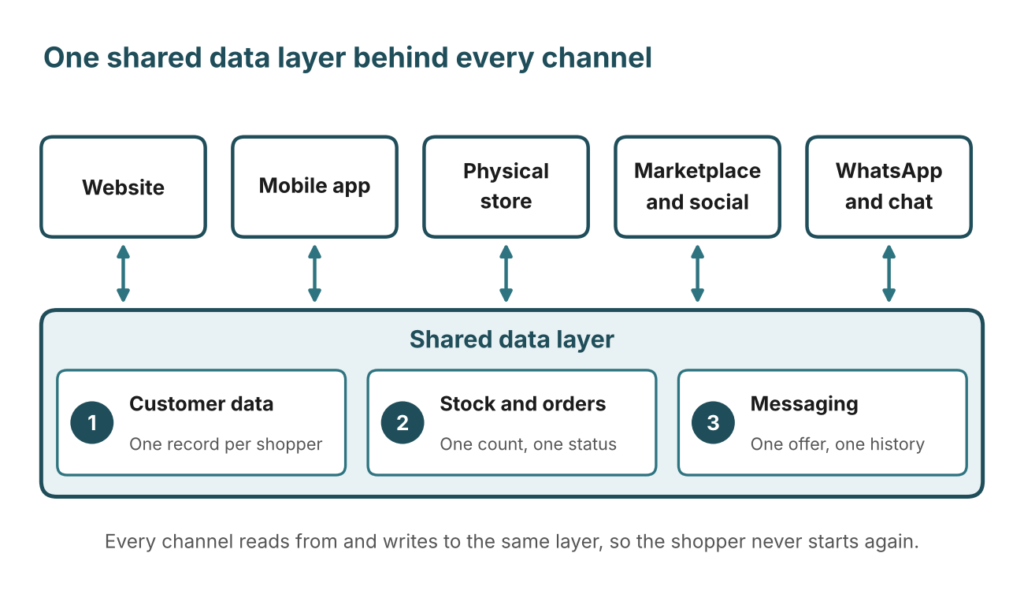
Figure 2. Every channel reads from and writes to one shared layer of customer, stock, and order data.
Unified Customer Data
Unified customer data means every channel reads from and writes to the same customer record. A shopper who joins a loyalty scheme in store should be recognized when they next open the app. The principle is one identity per customer, matched on a reliable detail such as an email address or phone number, with duplicates merged rather than left to pile up. Without that shared identity, one shopper looks like three strangers. In Vtiger One, the One View feature gathers a contact’s activity from several modules into a single record, so sales, marketing, and support share the same history.
Shared Inventory and Orders
Shared inventory and orders mean every channel sees the same stock and the same order status. A shopper who buys online should find the order in store when they arrive to collect or return it, and two channels should never sell the last item twice. Timing matters as much as accuracy, because a stock count that updates once a day will oversell fast-moving items. This layer normally lives in the ecommerce platform, the point-of-sale (POS) system, or an inventory tool. A CRM receives that order data so customer-facing teams can see it, rather than owning it.
Consistent Messaging Across Channels
Consistent messaging means the same offer, price, and tone reach the shopper on every channel, and replies continue where the last message stopped. A customer who asked about delivery on WhatsApp should not receive a promotion for something they have already bought.
In Vtiger One, the WhatsApp CRM features link each conversation to a contact, lead, deal, or support ticket, and connect through an approved provider such as Twilio. Because the conversation is attached to the record, the next person to reply can see what was said before.
To see how one record can hold orders, conversations, and follow-ups, explore the single customer view in Vtiger One.
Benefits of Omnichannel Commerce
Omnichannel commerce benefits shoppers through convenience and consistency, and benefits businesses through higher spending, stronger loyalty, and better data. The strongest published evidence is correlational: shoppers who use more channels tend to spend more and return more often. Whether omnichannel causes that behavior, or simply attracts customers who were already loyal, remains an open question.
A Harvard Business Review study of 46,000 shoppers, published in 2017, followed the customers of one US retailer over 14 months. It found that 73% used more than one channel. After controlling for shopping experience, those omnichannel retail customers spent an average of 4% more per store visit and 10% more online than single-channel customers. Shoppers who used four or more channels spent 9% more in store, and within six months they made 23% more repeat visits. The authors stress that these are correlations. The study covers one retailer, so treat it as a directional signal rather than a forecast for your business.
Benefits for Shoppers
- Convenience. Shoppers choose how to browse, buy, collect, and return, and can switch channels without starting again.
- Consistency. Prices, stock information, and loyalty balances match whichever channel the shopper uses.
- Less repetition. Staff already know the order and the history, so the shopper explains a problem only once.
Benefits for Businesses
- Better customer data. Purchases and conversations from every channel feed one record, which supports more relevant follow-up.
- Smarter use of stock. Pickup and ship-from-store let a business sell stock that would otherwise sit unsold in one location.
- Clearer measurement. One record shows which combinations of channels customers actually use, so investment follows real behavior.
Omnichannel Commerce Examples
The best omnichannel commerce examples share one feature: what the customer does on one channel changes what happens on another. Starbucks links app orders to in-store collection, Sephora links online orders to store pickup and loyalty rewards, and Decathlon links product-page stock checks to store collection. A small business can copy the pattern at a smaller scale.
Three terms appear in most examples, so the table defines them first and shows what each one needs behind the scenes.
| Term | What it means | What it needs behind the scenes |
|---|---|---|
| BOPIS | Buy online, pick up in store: the shopper pays online and collects from a shop | Accurate store stock and a way to reserve it for the shopper |
| Endless aisle | A store screen or assistant lets a shopper order an item the shop does not hold, usually for delivery | Access to the full catalogue and the online order system from inside the store |
| Ship from store | An online order is sent from a nearby shop’s stock instead of a central warehouse | Store stock visible to the order system, and a way to route the order to the right shop |
Starbucks: Order Ahead in the App
Starbucks explains that members can place an order in the app and collect it from the chosen coffee house without queuing at the till. The cross-channel feature is Mobile Order & Pay, and the order still earns Stars, so app and store purchases build one loyalty balance. Behind the scenes, the order must reach the chosen store, and the payment must be attached to the member’s account. The lesson is that the loyalty account, not the app itself, links the two channels.
Sephora: Pickup With Loyalty Attached
Sephora’s pickup page offers buy online, pick up in store at all locations, and its pickup FAQ says Beauty Insider Cash works at checkout for those orders. The shopper therefore keeps one loyalty account whether they buy in store or online. Not every perk carries over, though: pickup orders are not eligible for the free samples that come with shipped orders. The lesson is to decide which perks apply on each channel, and to say so before checkout.
Decathlon: Stock Checks Before Collection
Decathlon’s Irish site shows store availability on each product page and offers Click & Collect only when every item in the basket is in stock at the chosen store. Collection orders are filled from that store’s own stock, so the web shop and the physical shop draw on the same inventory. If one item is missing, collection is simply not offered, so the promise is never made. The lesson is that stock visibility comes first.
A Small Business Version
Picture a small plant shop with a WooCommerce website, a weekend market stall, and a WhatsApp number. Customers message to reserve plants, pay through the website, and collect at the stall. If all three channels write to one customer record and one stock list, the owner can see who bought what and message regular buyers about new stock. The owner does not need new software for every channel. Omnichannel starts with two connected channels, not twenty.
Challenges of Going Omnichannel
The main challenges of going omnichannel are fragmented data, inaccurate stock, tool costs, and unclear ownership. Many omnichannel ecommerce problems are organizational rather than technical. They happen when channels keep separate records, stock counts lag behind sales, or no one owns the cross-channel experience. Smaller businesses face the same issues with fewer tools.
- Duplicate customer records. The same person appears under different emails or phone numbers, so shoppers are treated as strangers and report overcounted customers. Clear merge rules reduce the problem.
- Stock that lags behind sales. If counts update slowly, a pickup promise fails, and the shopper loses trust in every channel.
- Returns and refunds across channels. A return in store for an online purchase needs the refund to reach the original payment and the item to return to the right stock. These rules are easy to overlook until the first cross-channel return arrives.
- Integration cost and effort. Connecting existing systems takes configuration, testing, and maintenance, which businesses often underestimate.
- No single owner. When each channel has its own manager and targets, nobody owns the journey that crosses them.
- Staff habits and incentives. Store teams need to look up online orders and handle pickups confidently, and targets should not reward one channel at the expense of another.
- Privacy and consent. Joining data across channels raises questions about permission, so businesses should record consent and follow local data protection rules.
How to Build an Omnichannel Commerce Strategy
Build an omnichannel strategy in order: choose the channels customers already use, connect their data, make stock visible, then add services such as pickup. Start with one journey, such as ordering online and collecting in store, and prove it works before adding another. Each new channel adds complexity, so add one only when customers ask for it
- Map the channels customers already use. List where shoppers find, buy, and ask for help today, and ignore channels you cannot staff properly.
- Choose where the customer record lives. Decide which system is the source of truth for contacts and history, and make every channel write to it.
- Make stock visible. Show availability on the website and in store before promising pickup or delivery.
- Launch one journey. Pick a single flow, such as order online and collect in store, and document each handoff between systems and people.
- Measure and adjust. Review the measures in the table below, then fix the weakest handoff before adding another channel.
Five measures show whether the connections are working.
| Measure | What it shows | Where the data usually sits |
|---|---|---|
| Customers using two or more channels | Whether channels are working together | CRM and ecommerce reports |
| Repeat purchase rate | Whether loyalty grows after the change | Ecommerce platform, POS, or CRM |
| Pickup orders ready on time | Whether stock data and store processes agree | POS or order system |
| Stock accuracy at pickup | How often a promised item is really there | Inventory system |
| Duplicate contact rate | The health of the customer record | CRM |
Technology You Need: Ecommerce, POS and CRM
An omnichannel ecommerce set-up relies on three connected systems:
- Ecommerce platform: Manages the online storefront, product listings, and checkout.
- Point-of-sale (POS) system: Processes in-store transactions and maintains retail sales records.
- Customer relationship management (CRM) system: Maintains customer records, interactions, and follow-ups.
Each system has a different responsibility. They need to exchange relevant information so customer, product, and order data stay consistent across channels. A CRM supports this process but does not replace the ecommerce platform or POS system.
The Three Layers
Understanding what each system manages helps businesses identify where integrations are needed and which platform should remain the source of truth.
| Layer | Main job | Data it usually owns | Limit |
| Ecommerce platform | Manages the online storefront and checkout | Product listings, online orders, payment records | Limited visibility into in-store transactions and customer conversations |
| POS system | Processes transactions at physical stores | In-store sales, till inventory, receipts | May not maintain online order details or chat history |
| CRM | Maintains customer records, interactions, and follow-ups | Contacts, conversations, support cases, campaigns | Relies on accurate information from ecommerce and POS systems |
How the Layers Connect
Businesses generally have three options for connecting their ecommerce, POS, and CRM systems. The right approach depends on the existing technology, integration requirements, and available resources.
| Integration method | How it works | What to consider |
| Unified platform | Manages multiple channels through a shared back end | Keeps data together but may limit the choice of tools |
| Ready-made integrations | Connects existing software through pre-built connectors | Quicker to implement, but supported fields and synchronization rules vary |
| Custom API integrations | Connects systems through purpose-built data exchanges | Offers greater control but requires development, testing, and maintenance |
A practical starting point: Small businesses can begin with ready-made integrations and move to custom connections when an existing integration cannot support a specific workflow.
Where a CRM Fits
A CRM connects customer information from different sales and communication channels. It gives customer-facing teams a consistent record of interactions, purchase activity, and follow-ups.
For example, the WooCommerce integration for Vtiger One synchronizes:
- Contacts
- Products
- Sales orders
- Tax records
The integration supports two-way synchronization, field mapping, and a sync log. It is available in the One Professional and One Enterprise editions.
How an Ecommerce CRM Supports Connected Selling
An ecommerce CRM connects customer and purchase information with sales, marketing, and service activities.
This helps teams:
- Understand purchase history: View customer transactions and related interactions.
- Coordinate follow-ups: Use purchase and engagement information to plan relevant communication.
- Manage customer requests: Connect service cases with the customer’s existing records.
- Maintain continuity: Give teams access to customer information when interactions move between channels.
The CRM manages the customer relationship layer, while the ecommerce and POS systems continue to handle their respective transactions and inventory functions.
What a CRM Cannot Do
A CRM is an important part of an omnichannel set-up, but it does not independently manage every commerce operation.
| Business function | System generally responsible |
| Online checkout | Ecommerce platform |
| Payment processing | Payment gateway or payment processor |
| Physical store transactions | POS system |
| Shelf and store inventory | POS or inventory management system |
| Customer records and interactions | CRM |
| Cross-channel data coordination | Integrations or a shared platform |
Businesses should also account for operational decisions that software cannot make on their behalf.
- Returns and refunds: Define how online purchases can be returned in stores and how refunds are processed.
- Pickup windows: Establish how long an order remains reserved for collection.
- Loyalty benefits: Decide which rewards and offers apply across different channels.
- Data accuracy: Set rules for updating and reconciling customer, product, and order records.
Before selecting an integration, verify which records it synchronizes, how frequently updates occur, and whether it supports the required workflows. This is particularly important when evaluating capabilities such as real-time inventory visibility or cross-channel order management.
Where to Start
Connecting every sales channel at once can make an omnichannel project unnecessarily complex. A more manageable approach is to begin with one customer journey and identify the information required at each stage.
A Simple Starting Framework
1. Choose a journey to connect
Start with a process customers already use, such as placing an order through WhatsApp and collecting it in store.
2. Map the information required
Identify the details each channel needs to access:
- Customer name and contact information
- Product availability
- Payment status
- Order confirmation and collection status
3. Identify where the data lives
Check whether the e-commerce platform, POS system, and CRM hold the relevant records. Identify information that needs to be synchronized between them.
4. Find gaps in the handoff
Look for steps where employees re-enter information, customers repeat details, or order updates don’t reach the next channel.
5. Connect and test the systems
Prioritize the integrations needed for the selected journey. Test the complete process before extending the same approach to additional channels.
Bringing Customer Information Together
A unified CRM can bring customer information and interactions from connected channels into a shared workspace. Vtiger One supports this customer-management layer, helping sales, marketing, and service teams coordinate their activities using a more consistent view of customer information.
The objective is not to connect the most channels. It is to make the channels customers already use work together reliably.
Frequently Asked Questions (FAQs)
What is omnichannel commerce?
Omnichannel commerce is selling through several channels that share data, so the customer and the order look the same everywhere. It applies to any business whose customers mix web, phone, messaging, and in-person contact, whatever the size or sector. What matters is how well the channels connect, not how many a business has.
What is the difference between omnichannel and multichannel?
Multichannel commerce keeps channels separate, so shop staff cannot see an online order and the shopper must explain it from scratch. Omnichannel commerce links the records, so any channel can answer an order question. Both sell in many places, but only omnichannel treats the shopper as one person across all of them.
What are examples of omnichannel commerce?
Beyond omnichannel retail brands, examples include supermarkets offering click and collect, car dealers booking test drives by app, phone, or showroom against one customer file, and B2B suppliers accepting orders by portal and WhatsApp. The common thread is a single customer account and order history that follows the buyer across channels.
What are the benefits of omnichannel commerce?
The benefits depend on how well each feature works in practice. Shoppers gain only when pickup and shared loyalty work as promised, and a broken handoff can damage trust. Customers also need time to try a second channel, so judge results over months rather than weeks, and compare them with the period before the change.
What is BOPIS?
BOPIS is a fulfillment process, not just a button. After the shopper pays online, the shop reserves the stock, sends a ready notice, and hands over the order against an order number or barcode. Curbside pickup is a variant where staff brings the order to the car. Retailers set their own hold periods and fees.
What technology do you need for omnichannel commerce?
For omnichannel ecommerce, list what you own and what each tool stores. Most small businesses already run an ecommerce platform, a payment terminal, and a messaging account. Mark which of them hold customers, which hold stock, and which hold orders. The gaps and overlaps in that list show what to connect first, before any new purchase.
Is omnichannel only for large retailers?
No, because size changes how complex the systems are, not whether the idea applies. Large retailers connect thousands of products across many stores, while a small business can begin with one shared customer record and one stock list. Start with the two channels customers use most, then add others as demand grows.
How does a CRM support omnichannel commerce?
A CRM supports the customer side of omnichannel selling. It can segment shoppers by purchase history, schedule follow-up after an order is collected, and link service cases to the original order. Teams then act on what each channel reveals, rather than reading separate reports from every system.