A sales CRM helps businesses organize leads, automate follow-ups, and streamline every stage of the sales process. By centralizing customer information, tracking interactions, and giving pipeline visibility, it reduces missed opportunities, shortens sales cycles, and improves conversion rates. Modern AI-powered CRMs also help teams prioritize high-value leads and make data-driven decisions.
Every business loses leads. The question is where, and how many. A promising inquiry arrives on a Friday afternoon, sits unanswered over the weekend, and by the time someone replies, the buyer has moved on. Another slips through because it lived in one rep’s inbox. These are not rare accidents; they are structural leaks in a sales process that runs on spreadsheets and disconnected tools. A sales CRM exists to close those leaks, and the difference shows up directly in revenue.
Why Businesses Lose Leads During the Sales Process
Leads rarely vanish all at once. They drain out through specific, repeatable gaps in the sales process, and each gap carries a measurable cost.
| Leak point | What goes wrong | Cost to the business |
| Slow or forgotten follow-ups | Warm buyers cool before a rep replies | Missed opportunities and lower conversion |
| Poor lead tracking | Inquiries are logged inconsistently, or not at all | Leads lost with no record to recover them |
| No pipeline visibility | Managers cannot see which deals are stalling | Problems surface only after the quarter is lost |
| Data scattered across tools | Reps work from stale, conflicting information | Longer sales cycles and wasted effort |
| Weak team communication | The same lead gets contacted twice, or ignored | Poor experience and neglected customers |
If your team recognizes these patterns, the underlying issue is a process problem, and the signs you need a CRM are already visible in your numbers.
What Is a Sales CRM
A sales CRM is a platform built specifically to manage leads, deals, contacts, and every interaction across the sales cycle. It centralizes customer data, tracks each lead from first touch to closed deal, manages opportunities through defined stages, records sales activity, and forecasts revenue from live pipeline data.
That focus is what separates it from a general CRM. A general customer relationship management system serves marketing, support, and sales broadly; a sales CRM is tuned for the seller’s job. For sales-led teams, a purpose-built CRM for sales teams turns a scattered process into a single, measurable system.
How a Sales CRM Fixes Your Sales Process
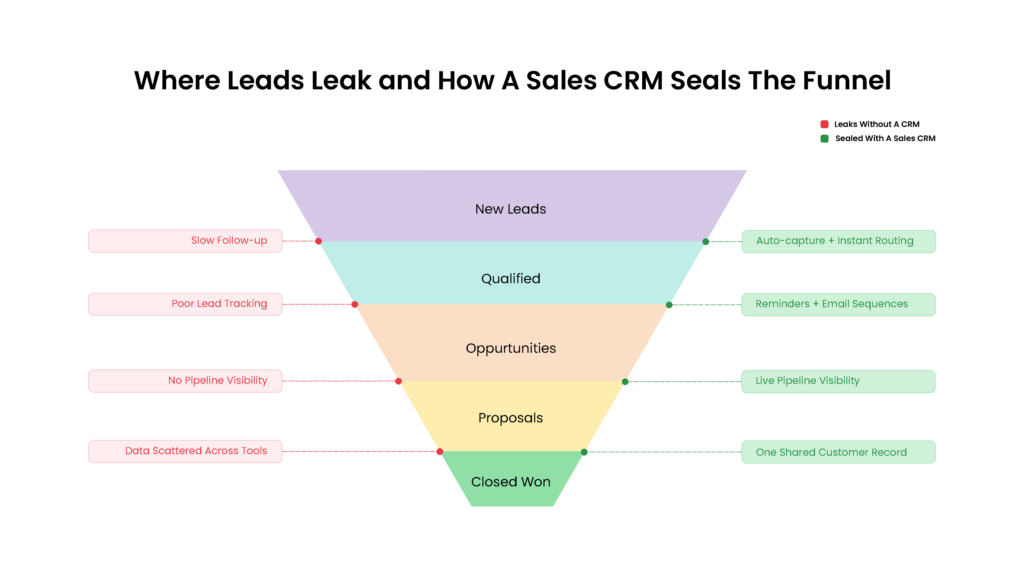
A sales CRM closes the manual gaps at each stage where leads and momentum leak. That is how CRM helps sales teams convert more of what they capture:
Captures and Organizes Every Lead
The CRM pulls leads from web forms, email, phone, social media, and manual imports into one central database, so no inquiry depends on a single inbox. Connecting capture to pre-sales process steps means qualification starts the moment a lead arrives.
Automates Lead Assignment
Round-robin, territory-based, and skill-based routing ensure every new lead reaches the most suitable sales rep in seconds. Quicker assignments lead to faster follow-ups, and early engagement significantly improves conversion rates.
Streamlines Follow-ups
Automated reminders, email sequences, task management, and follow-up notifications ensure no lead waits days for a reply. The system prompts the next action so a busy rep never forgets a warm opportunity.
Provides Complete Pipeline Visibility
Clear sales stages, deal tracking, and bottleneck identification show exactly where every opportunity sits. Managers spot stalling deals early and forecast with accuracy grounded in real pipeline movement. Vtiger One, for example, guides reps through each stage with Playbooks, a set task sequence attached to every deal stage.
Improves Team Collaboration
Shared customer records, full activity history, internal notes, and clear task ownership keep everyone aligned on each account. This cross-functional visibility is the foundation of solid revenue operations, where sales, marketing, and support work from one source of truth.
Delivers Actionable Insights
CRM analytics turn activity into direction. Sales reports track conversion rate by stage, average lead response time, sales cycle length, win rate, and team performance, so revenue forecasting rests on evidence. Gartner found that sales organizations providing AI-enabled next-best actions are 2.6 times more likely to achieve commercial growth.
Key Features Every Sales CRM Should Have
A sales CRM’s value comes down to how well a handful of core features capture, track, and convert leads. Weigh each against how your team actually sells.
Lead Management
The CRM captures each new lead and scores it against your ideal-customer criteria the moment it arrives. Qualified leads then route to a rep automatically, so none sits waiting to be noticed.
Contact Management
Every record holds a full customer profile and the complete history of past interactions. A single communication timeline unifies calls, emails, and meetings, so reps open each conversation already knowing the story.
Sales Pipeline Management
A visual pipeline lays out every open deal by stage, from first contact to close. Tracking each one as it moves shows managers which deals are advancing and which have stalled.
Workflow Automation
Once you set the rules, routine steps run on their own: a task is created, a reminder fires, an approval routes to the right manager. That removes the manual admin quietly slowing every deal.
AI-Powered Sales Assistance
AI ranks incoming leads through predictive lead scoring, so reps spend their time on the prospects most likely to buy. It also drafts recommendations and summarizes conversations, cutting the prep before each follow-up.
Reporting and Analytics
Dashboards track the numbers that run a sales team: conversion by stage, win rate, and forecast accuracy. With those in view, managers coach reps, plan capacity, and forecast on evidence.
Benefits of Using a Sales CRM
A sales CRM changes the numbers that matter, from first response time to final forecast accuracy. Here is what teams gain in practice:
- Every web form, email, and phone inquiry lands in one database, so no lead dies in an SDR’s overloaded inbox.
- New leads route to the right rep in seconds, so a buyer hears back while their intent is still fresh.
- Reps lose hours each week to logging and reminders; automation hands those hours back to active selling.
- A new hire follows the same qualified steps as your best closer, so outcomes stop depending on who owns the deal.
- Sales, marketing, and support work from one record, so handoffs stop dropping context, and customers never repeat themselves.
- A rep opens the record seeing every past call and issue, so no customer feels like a stranger at hello.
- Lead scoring surfaces the buyers most ready to purchase and prompts follow-up at each stage, converting deals while warm.
- Sales leaders forecast from live pipeline and real win rates, so the number they give finance holds at quarter end.
- Managers swap opinion for evidence: conversion by stage, response time, sales cycle length, and win rate in one dashboard.
- As leads and headcount grow, automated workflows absorb the load, so the team scales while manual data entry stays flat.
Best Practices for Implementing a Sales CRM
Technology alone fixes nothing; the results come from disciplined rollout and daily habit. Done well, a CRM implementation shortens the ramp to productivity, drives the adoption that protects the investment, and closes the process gaps where leads were leaking.
Define Your Sales Process
Map every sales stage, identify bottlenecks, and standardize workflows before configuration, so the CRM mirrors a structured sales process your team already understands, and new reps ramp faster.
Keep CRM Data Clean
Remove duplicates, update records on a schedule, and maintain accurate customer information, because clean data is what makes forecasts, reports, and lead scores worth trusting.
Automate Repetitive Tasks
Automate lead assignment, email follow-ups, reminders, and routine workflows first, where the time savings are largest and every automated hour returns to active selling.
Train Your Sales Team
Drive adoption through clear best practices, consistent data entry standards, and reporting habits, so the CRM becomes the way the team sells and the investment returns.
Measure and Optimize
Review CRM reports, monitor KPIs like conversion rate and sales cycle length, and refine workflows continuously, so the system compounds value as the team and market change.
What disciplined implementation delivers
- Faster time-to-value: Reps reach full productivity in weeks when the process is mapped before rollout.
- Trustworthy numbers: Clean, synced data feeds forecasts and dashboards leadership can act on with confidence.
- Durable adoption: A CRM built around how the team already sells becomes daily routine, protecting the spend.
- Fewer lost leads: Every process gap you close is a lead retained and a shorter path to revenue.
How AI Is Transforming Sales CRM
AI is now built into most sales CRMs, taking on work that used to fall to the rep. It scores and forecasts, automates the next step, drafts routine emails and summaries, and answers questions in plain language.
Predictive Lead Scoring and Forecasting
AI ranks incoming leads by likelihood to convert, so sellers work the best ones first. It also projects revenue from live pipeline signals, giving managers sharper forecasts grounded in real deal movement.
Intelligent Workflow Automation
AI triggers the next step in a deal the moment a stage changes, and surfaces next-best-action recommendations that tell a rep exactly what to do next on each account.
AI Writing and Summaries
Automated email drafting and post-meeting summaries cut the admin that fills a rep’s day, capturing every call and thread against the record with no manual note-taking.
Conversational AI and Copilots
Conversational AI and CRM copilots answer questions in plain language, letting a rep pull pipeline data or update a deal by simply asking.
The payoff is time returned to selling. Gartner found that AI saves sellers nearly five hours a week, though 72% of sales organizations fail to reinvest that time in high-value activities. Deciding which business cases suit AI is what turns saved hours into closed deals. Predictive tools such as Calculus AI in Vtiger One surface these recommendations for reps to act on, keeping the decision with the human.
FAQs
What is a sales CRM?
A sales CRM is software built to manage leads, deals, and contacts across the sales cycle. It centralizes customer data, tracks every interaction, automates follow-ups, and forecasts revenue, giving sales teams one system to move prospects from first touch to closed deal.
How does a sales CRM improve the sales process?
It closes the gaps where leads leak. The CRM captures every inquiry, routes it to the right rep quickly, prompts timely follow-ups, and shows the full pipeline, so fewer opportunities stall and more convert. The process becomes standardized, measurable, and repeatable.
Can a CRM help reduce lead loss?
Yes. Lead loss usually comes from slow follow-up, poor tracking, and scattered data. A sales CRM captures leads into one database, assigns them automatically, and reminds reps to act, so warm leads are worked before they cool, and none are forgotten.
What features should I look for in a sales CRM?
Lead management, contact management, visual pipeline management, workflow automation, reporting, and AI-powered assistance work together to capture and qualify leads, track opportunities, eliminate manual work, and provide the insights sales managers need to forecast accurately and coach effectively.
Is a sales CRM suitable for small businesses?
Yes. Small teams often lose the most to disorganized processes, so a sales CRM pays off quickly. Many platforms offer affordable or free starting tiers, letting a growing business standardize its pipeline early and scale the system as the team expands.
How does AI improve a sales CRM?
AI scores and prioritizes leads, forecasts revenue, drafts emails, summarizes meetings, and recommends next-best actions. This removes routine admin and helps reps focus on the highest-value opportunities, provided the team reinvests the saved time into selling and relationship building.
How long does it take to implement a sales CRM?
It varies with team size and process complexity. A small team can be running in days, while larger rollouts with data migration and custom workflows take several weeks. Clean data, a defined sales process, and staged training all shorten the timeline.