CRM Implementation- A Complete 2026 Guide to Implement CRM for Businesses
At some point in every growing business, spreadsheets become cluttered, email threads grow unmanageable, and customer follow-ups start slipping through the cracks.
That is not a failure; it is a sign that your business is evolving. And with that growth comes the need for a smarter, more scalable way to manage customer relationships.
This is where CRM, or customer relationship management software, comes in. But selecting a CRM platform is only the beginning. The true value lies in how well it is implemented to fit your workflows, how confidently your team adopts it, and how effectively it supports your customer lifecycle.
This guide will help you understand what CRM implementation really involves and how to approach the process thoughtfully to build long-term efficiency, team alignment, and sustainable growth.
What is CRM implementation?
CRM implementation refers to the process of introduction and integration of Customer Relationship Management tool into an organization.
The pre-implementation stage of CRM involves:
- Planning the goals and objectives of installing the CRM software
- Having strong awareness of business needs
- Determining the project scope
- Involving key stakeholders from various departments
These measures can help develop the right CRM strategy and support the successful implementation of the CRM tool.
10 Steps Guide to Successful CRM Implementation in 2026
Implementing a CRM touches multiple teams, systems, and workflows, which is why the process needs to be planned in stages. From defining objectives to refining the system after launch, each step plays a role in how effectively the CRM is adopted and used over time.
Step 1: Define business objectives
Establish clear goals for the CRM system implementation at the organizational level. Identify the business problems to address, such as improving sales pipeline visibility, reducing response times in customer support, increasing cross-team coordination, or enhancing reporting accuracy. Set measurable KPIs to evaluate success.
Step 2: Assess current processes and systems
Analyze existing workflows, tools, and data management practices across departments. Identify bottlenecks, redundancies, and gaps in customer information. Evaluate which legacy systems or spreadsheets are currently used and determine how data can be standardized for CRM migration.
Step 3: Identify stakeholder needs
Consult key stakeholders from sales, marketing, customer support, operations, and IT. Document requirements related to workflows, reporting, automation, and integrations. Understanding these needs ensures the CRM aligns with operational realities rather than being purely technology-driven.
Step 4: Select the right CRM platform
Evaluate CRM options based on scalability, feature set, integration capabilities, security standards, and ease of use. Consider how the platform will support current processes and future growth, including multi-department usage, analytics requirements, and mobile or remote access.
Step 5: Plan implementation and resource allocation
Develop a detailed CRM implementation process roadmap with timelines, milestones, and resource assignments. Define roles for project management, IT, and departmental leads. Decide whether to implement in phases or organization-wide, considering the complexity of existing systems and workflows.
Step 6: Customize and configure the CRM
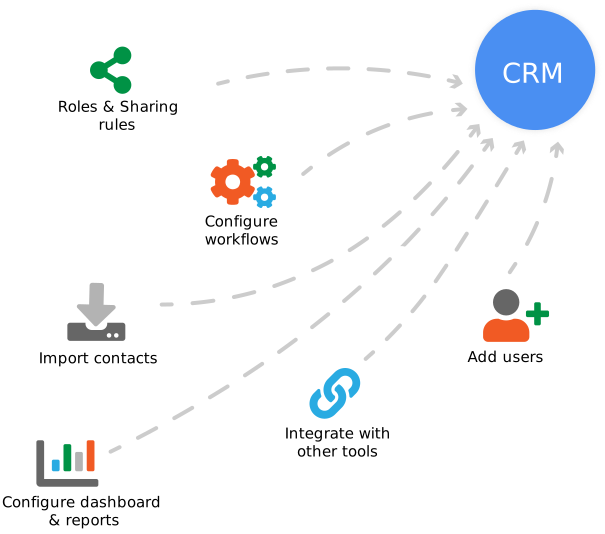
Adjust system settings to match operational processes. Configure fields, pipelines, user roles, access permissions, and dashboards. Integrate with existing tools such as marketing automation, ERP, customer service platforms, and communication systems to create a unified operational environment.
Step 7: Migrate and validate data
Transfer customer and operational data from spreadsheets, legacy CRMs, and other sources. Conduct data cleaning, standardization, and mapping to prevent duplication or errors. Validate migrated data to ensure accuracy and completeness before making the CRM operational.
Step 8: Conduct testing
Test all system functionalities, workflows, user permissions, and integrations. Run pilot scenarios to identify gaps, errors, or inefficiencies. Address technical issues, automation errors, and reporting inconsistencies prior to organization-wide deployment.
Step 9: Train teams and provide support
Deliver role-specific training for sales, marketing, customer service, and management teams. Provide documentation, support materials, and access to help resources. Ensure users understand workflows, reporting dashboards, and automation processes to maximize adoption and operational efficiency.
Step 10: Monitor, optimize, and iterate
Track system usage, operational impact, and KPI achievement. Collect user feedback and adjust configurations, workflows, and automation rules as needed. Continuously optimize the CRM to align with evolving business processes, reporting requirements, and growth objectives.
Benefits of successful CRM implementation
Implementation of the right CRM application facilitates a multitude of benefits for the business firm, whether it is a small-scale, medium size or large corporation. It makes sales, marketing, and customer support processes more data-driven and customer–centric. Have a look at the top benefits of a successful CRM implementation:
- Quality customer experience
- Optimized sales and marketing processes
- Increased team productivity
- Competitive edge
- Improved customer engagement
- Data-driven decision-making
- Effective lead management
How to Prepare for CRM Implementation
Before rolling out a CRM platform, it’s crucial to prepare your business for the change, not just technically but also culturally and operationally. CRM implementation involves underlying steps that should be executed alongside software installation. Here’s a step-by-step guide to help you prepare in a way that avoids disruption and delivers ROI from day one.
1) Discuss the Main Goals and Challenges with Business Stakeholders
Start by identifying what business outcomes you expect from your CRM. Is it improving lead response time? Centralizing customer touchpoints? Increasing upsell opportunities? Once the goals are clear, align them with the CRM’s capabilities. This ensures your implementation stays focused on practical outcomes, not just software adoption. Involve stakeholders from across departments like sales, marketing, service, and even finance, because CRM impacts everyone, not just the sales team.
2) Document All Internal Processes and Daily Tasks
A CRM should fit into your existing workflows, not the other way around. Document how customer interactions currently flow through your business, from lead generation to post-sale support. Identify inefficiencies, handoff gaps, and manual steps that slow things down. This documentation will inform your CRM configuration. Without it, you risk automating broken processes or creating friction between departments.
3) Define a Realistic Project Timeline and Budget
CRM implementation rarely follows a straight line. Instead of setting an aggressive deadline, create a phased rollout plan. Prioritize core modules, like contact management and lead tracking, before moving on to more advanced features. Your budget should include more than just software licenses; factor in setup costs, integrations, internal man-hours, and post-launch support. Also, consider the cost of delays caused by unclear requirements or untrained users.
4) Prepare for Multiple Project Scenarios
Think beyond best-case scenarios. What if key data isn’t ready? What if your team resists adoption? What if the tool doesn’t integrate as expected? Build contingency paths for common challenges. This isn’t pessimism, it’s risk management. Document these as “Plan B” responses and align them with your rollout phases.
5) Establish Essential Metrics for Measuring Success
You can’t improve what you don’t measure. Define what success looks like, both short-term and long-term. Examples might include:
- Reduction in lead response time
- Increase in sales-qualified leads
- Reduction in customer churn rate
- Improvement in first-contact resolution in support
Make sure every department tied to the CRM has at least one metric they are accountable for post-implementation.
6) Set Communication Channels and Develop a Communication Plan
Miscommunication can derail projects. Set a clear communication structure, such as weekly check-ins, cross-functional progress updates, escalation processes, and a shared source of truth, like a project board or internal wiki. Assign someone to manage this internally, whether it’s a project coordinator or CRM lead.
7) Identify Project Stakeholders and Define Individual Roles
CRM success depends on internal ownership. Each stakeholder should know their scope, timeline, and dependencies. Identify key roles, like the project manager, department leads, and technical experts. Assign responsibilities for decision-making, data handling, and team coordination. This clarity avoids confusion, keeps the project aligned with business goals, and ensures smooth execution. Early role definition is key for accountability, faster approvals, and a CRM setup that truly fits your operational needs.
8) Explore and Harmonize Your Source Data
Migrating bad data into a new CRM is like building a house on a cracked foundation. Audit your current contact databases, remove duplicates, correct formatting errors, and fill in critical gaps, like missing emails or job titles. Clean data not only improves CRM performance but also builds trust in the system among users.
9) Develop a Change Management Plan
Most CRM projects fail not because of technology, but due to resistance to change. Create a structured change management plan, which includes user training, milestone-based progress tracking, early feedback collection, and support channels for questions or friction points. The faster your team sees value in using the CRM, the smoother your rollout will be.
Getting started with CRM implementation tools
When businesses choose to implement a CRM, it’s usually driven by a clear need: better visibility, streamlined follow-ups, and stronger customer relationships. Vtiger CRM addresses these goals without overwhelming your team. It centralizes sales, marketing, and support in one place, so your teams can collaborate effectively with a clear understanding of their roles, responsibilities, and operational objectives.
The platform is not only intuitive and customizable but also offers guided implementation support, simplifying the setup process.
For businesses seeking functionality without complexity, Vtiger strikes the perfect balance of control and simplicity. It’s not just a tool; it’s a comprehensive system designed to support and scale with how your business operates and grows.
Conclusion
CRM implementation is a business-critical initiative that requires clear objectives, stakeholder alignment, process mapping, and effective change management. Without proper planning, the project risks low user adoption and poor ROI.
To ensure success, focus on data readiness, cross-functional collaboration, and selecting a scalable solution that aligns with your operational model. A great starting point is to explore the free version of Vtiger CRM. This allows you to evaluate its features, usability, and integration potential before committing to a full-scale deployment.
The Vtiger 1-Week Implementation Challenge
At Vtiger, we make CRM implementation fast and easy with our 1-Week Challenge. In just one week* we’ll get your CRM up and running with no lengthy processes or delays. With years of experience and a user-friendly platform, we simplify the setup, ensuring that your team can quickly start managing customer relationships and driving growth.
Our focused, collaborative approach eliminates the complexity of traditional CRM implementations, so you can unlock your business potential and start seeing results without the wait.